Telegram Web Apps (TWA): How to Launch a Full SaaS Inside Telegram

Telegram has transcended its origins as a privacy-focused messaging client to become a powerful, cross-platform runtime environment. The introduction of Telegram Web Apps (TWA), officially known as Telegram Mini Apps, allows developers to build highly interactive single-page applications (SPAs) that load directly inside the Telegram application shell.
This provides startups and enterprises with immediate, frictionless access to over 900 million active users. By embedding your B2B SaaS, CRM interface, or utility tool inside a Telegram bot, you remove the classic conversion hurdles of app store downloads, desktop logins, and sign-up flows.
In this developer guide, we will analyze the technical architecture of a TWA, implement a secure hash verification check on the backend, and look at frontend integration patterns.
The Telegram Mini App Ecosystem Architecture
Unlike traditional web applications, a TWA has a dual parent relationship. The frontend runs in a sandboxed browser component (WebView) controlled by the Telegram client app, while the backend speaks both to the Telegram Bot API and your application database.
+-----------------------------------------------------------+
|                      Telegram Client                      |
|  +-----------------------------------------------------+  |
|  |                Mini App (WebView UI)                |  |
|  |     (Uses window.Telegram.WebApp SDK for bridge)    |  |
|  +--------------------------+--------------------------+  |
+-----------------------------|-----------------------------+
       | (initData Query)     | (Secure HTTPS Request)
       v                      v
+--------------+       +------------------------------------+
| Telegram API |       |            Your Backend            |
|  (Webhooks)  |       |  (Validates initData via HMAC-256) |
+------+-------+       +-----------------+------------------+
       |                                 |
       +----------------> [DB Sync] <----+
1. Security First: Validating the initData Payload
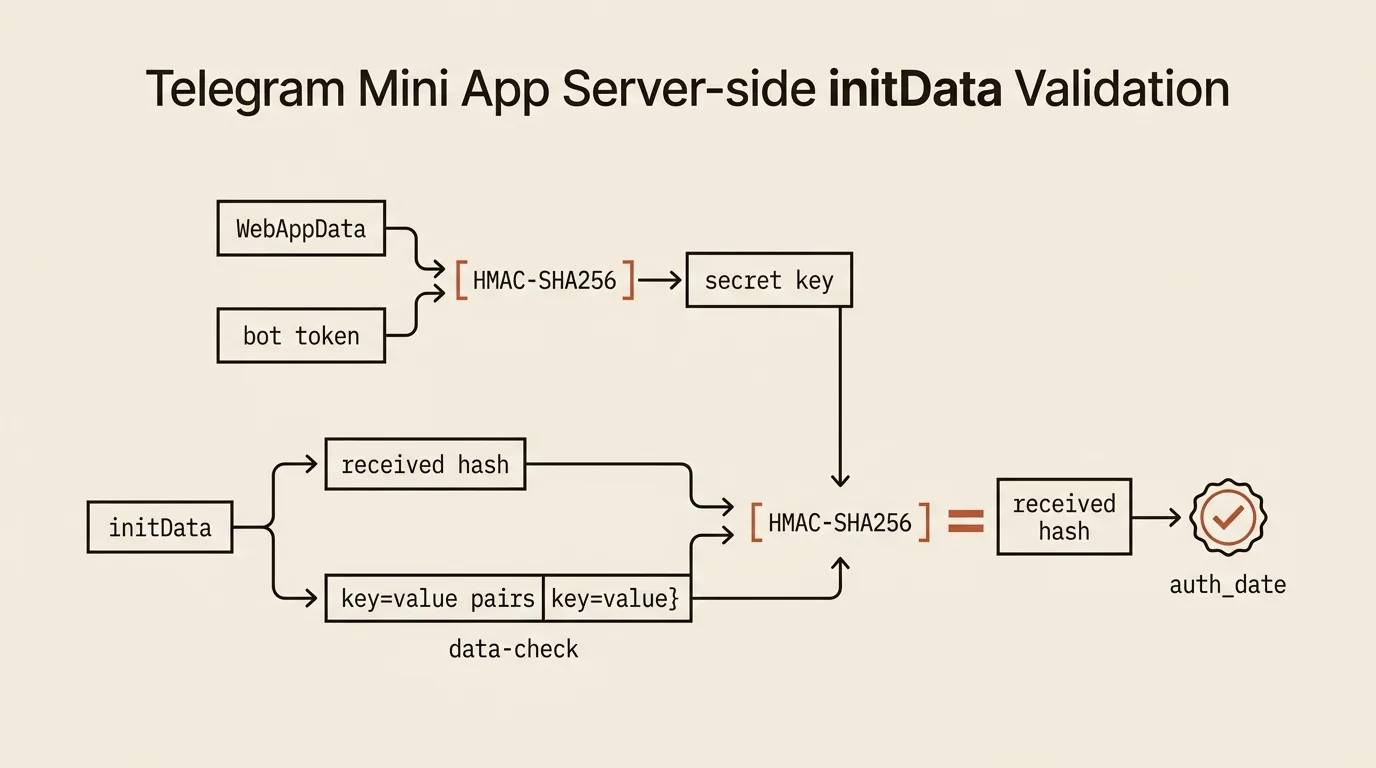
When a user opens your Mini App, Telegram appends a parameter called tgWebAppData (or raw search parameters) containing user profiles, launch contexts, and a security hash.
To prevent users from modifying their user IDs or mocking paid subscription privileges, you must validate this hash on your backend using your Telegram Bot Token as the HMAC key.
Here is the cryptographic validation implementation using Node.js:
import crypto from 'crypto';

interface TelegramUserData {
  id: number;
  first_name: string;
  last_name?: string;
  username?: string;
  language_code?: string;
  is_premium?: boolean;
}

interface ValidationResult {
  isValid: boolean;
  user?: TelegramUserData;
}

export function verifyTelegramInitData(rawQueryString: string, botToken: string): ValidationResult {
  const urlParams = new URLSearchParams(rawQueryString);
  const hash = urlParams.get('hash');

  if (!hash) {
    return { isValid: false };
  }

  // 1. Sort all incoming parameters alphabetically, excluding the hash itself
  const keys = Array.from(urlParams.keys()).filter(key => key !== 'hash').sort();

  // 2. Re-create the verification data-check string
  const dataCheckString = keys
    .map(key => `${key}=${urlParams.get(key)}`)
    .join('\n');

  // 3. Generate the secret cryptographic key
  // We use the constant string "WebAppData" to sign the bot token first
  const secretKey = crypto
    .createHmac('sha256', 'WebAppData')
    .update(botToken)
    .digest();

  // 4. Calculate the expected hash of the sorted string
  const computedHash = crypto
    .createHmac('sha256', secretKey)
    .update(dataCheckString)
    .digest('hex');

  // 5. Compare computed signature with the signature sent by the client
  const isValid = computedHash === hash;

  if (!isValid) {
    return { isValid: false };
  }

  // Parse user data object if validation succeeded
  try {
    const userRaw = urlParams.get('user');
    const user: TelegramUserData = userRaw ? JSON.parse(userRaw) : undefined;
    return { isValid: true, user };
  } catch (error) {
    return { isValid: true };
  }
}
2. Frontend Integration & Theme Synchronization
To deliver a premium UI/UX, your Mini App should visually blend with the Telegram client’s dark/light settings. You can access the styles and control client-side behaviors using the official Telegram WebApp JS library.
Step 1: Include the Script in Nuxt 3 / HTML
Add the official script to your page header or use the useHead composable in Nuxt:
// app.vue or page layout
useHead({
  script: [
    { src: 'https://telegram.org/js/telegram-web-app.js', defer: true }
  ]
})
Step 2: Access the WebApp Bridge in Vue
Create a Vue composable to access and synchronize Telegram styles:
// composables/useTelegram.ts
import { ref, onMounted } from 'vue';

export function useTelegram() {
  const isReady = ref(false);
  const user = ref<any>(null);

  onMounted(() => {
    const tg = (window as any).Telegram?.WebApp;
    if (tg) {
      tg.ready();
      tg.expand(); // Request the container to fill maximum vertical space

      user.value = tg.initDataUnsafe?.user;
      isReady.value = true;

      // Apply Telegram theme colors to CSS custom properties
      const root = document.documentElement;
      root.style.setProperty('--color-tg-bg', tg.themeParams.bg_color);
      root.style.setProperty('--color-tg-text', tg.themeParams.text_color);
      root.style.setProperty('--color-tg-button', tg.themeParams.button_color);
      root.style.setProperty('--color-tg-button-text', tg.themeParams.button_text_color);
    }
  });

  return { isReady, user };
}
3. Monetization: Payments via Telegram Stars
When operating inside Telegram, all digital services or content purchases must comply with Apple App Store and Google Play policies. Telegram enforces this by requiring the use of Telegram Stars (XTR) for digital goods.
The flow for receiving Stars payments:
- Request Invoice: The TWA requests the backend to generate an invoice.
- Bot Sends Invoice: The backend calls Bot API
sendInvoiceusing the currencyXTR. - Client Checkout: The Telegram client opens a native overlay allowing the user to pay using Stars purchased in-app.
- Verification: Telegram sends a webhook
successful_paymentto your bot, which credits the user's account in your DB.
In my Telegram bot hosting platform, TeleGo.io, we provide exactly these billing options, allowing users to spin up their own TWAs and receive Stars instantly. Additionally, we support hybrid human-AI helpdesks, which you can learn to build in my guide on RAG AI Customer Support Bots.
For physical goods and consulting services, traditional gateways can be used. Read my SaaS Stripe Billing Integration guide for Express/TypeScript templates.
Sources and documentation
- Telegram Mini Apps — the official WebApp SDK and initData documentation
- Bot Payments API — invoices, Telegram Stars, and payment webhooks
By combining native web frameworks with the Telegram WebApp API, developers can ship complex SaaS platforms and digital products directly into active messaging channels.
If you are planning to build a high-performance Telegram Mini App with secure billing integrations and dynamic frontend design, check out my Telegram Bot Development Service or request a Technical Architecture Consultation to get a production blueprint.
Frequently asked questions
How is a Telegram Mini App different from a regular bot?
A bot communicates through messages and buttons, while a Mini App opens a full web interface inside Telegram: dashboards, catalogs, forms, charts. It's an SPA running in a WebView with its own frontend, and authorization happens automatically through the Telegram account.
How do I verify that user data in a Mini App isn't forged?
Through cryptographic initData validation: Telegram signs the user data with an HMAC-SHA256 signature derived from the bot token. The backend must recompute and compare the signature on every request — without it, anyone can impersonate any user.
When are Telegram Stars mandatory, and when can I use Stripe?
Digital goods and subscriptions inside a Mini App must be paid with Telegram Stars per Apple and Google policies. Physical goods, services, and consulting can be sold through classic gateways like Stripe.

Author
Alex RelFullstack Engineer
In commercial development since 2011 — over 15 years. Author of two SaaS products, TeleGo.io and LingvoHabit.com. The articles here come out of real client and product work.