SaaS Monetization: Implementing Stripe, Billing, and Subscriptions Without Pain
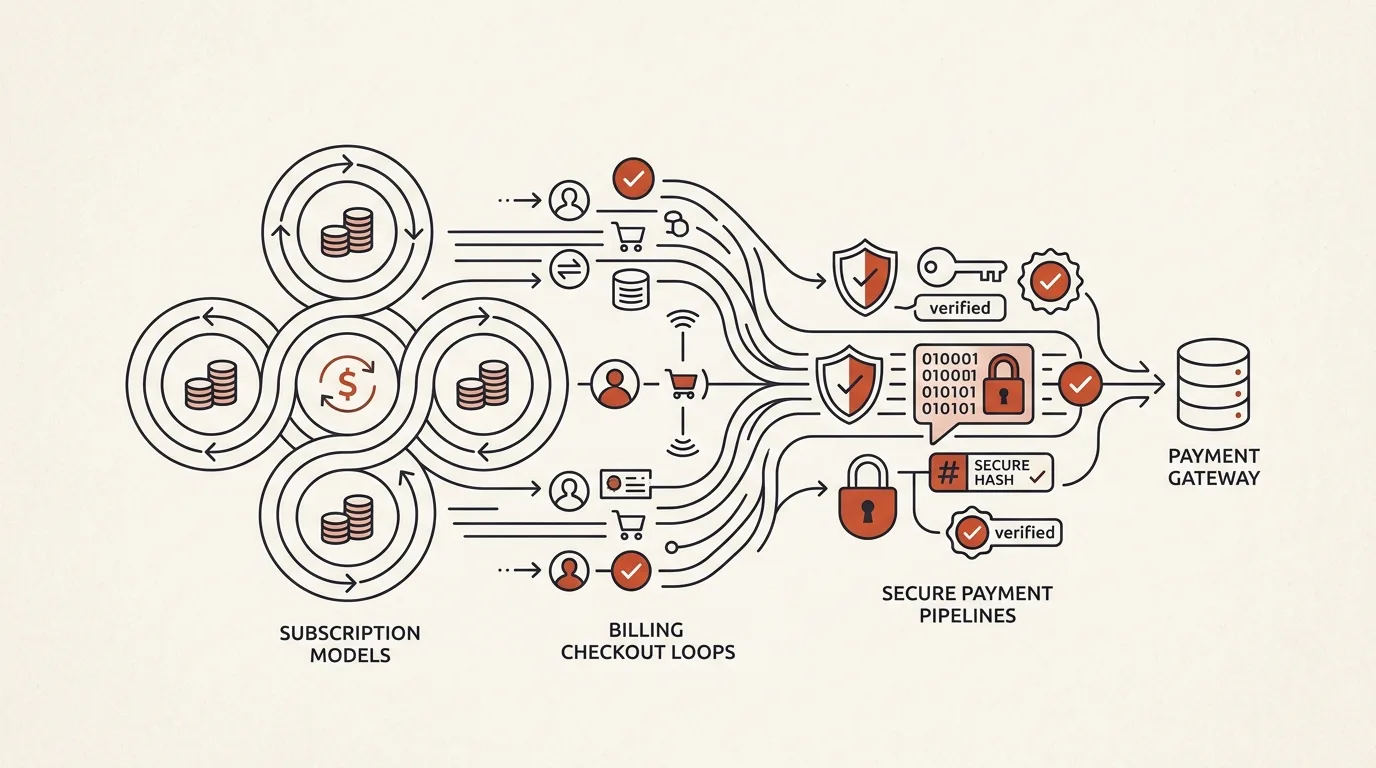
Integrating recurring payments into a SaaS is notorious for being deceptively complex. While charging a credit card once is relatively straightforward, managing subscription lifecycles introduces a web of edge cases: handling card expirations, retry intervals, tier upgrades, plan downgrades, grace periods for failed payments, and webhooks processing.
If a webhook fails or is handled out of order, you might block paying users or grant free access to canceled subscribers.
In this comprehensive playbook, we will implement a production-ready, signature-verified Stripe webhook handler in Node.js/TypeScript and map out the complete database synchronization lifecycle.
1. The Anatomy of Subscription Lifecycles
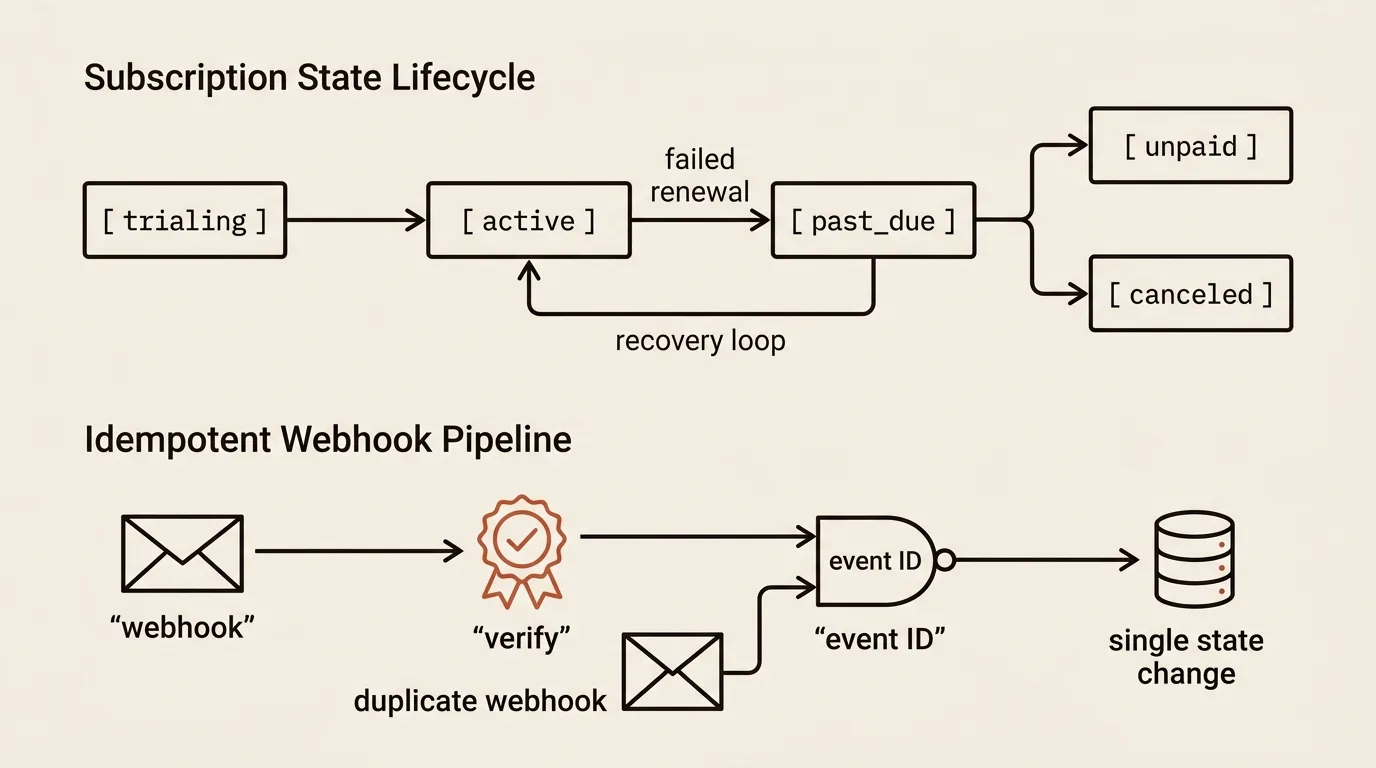
Your database must track the exact status of a tenant's subscription. Stripe maps these to several statuses, which you should mirror in your schema:
               +--------------------------------------+
               |               trialing               |
               +------------------+-------------------+
                                  | (Trial ends or user upgrades)
                                  v
+------------------->  +----------------------+
|                      |        active        | <------------------+
|                      +----------+-----------+                    |
| (Card updated,                  |                                |
|  charge succeeds)               | (Payment fails, Stripe retries) | (User renews
|                                 v                                |  before end)
|                      +----------+-----------+                    |
+---------------------+|       past_due       |                    |
                       +----------+-----------+                    |
                                  | (All retries fail / period ends) |
                                  v                                |
                       +----------+-----------+                    |
                       |       canceled       | -------------------+
                       +----------------------+
trialing: User has full access without being charged yet.active: Successful payment. Full access.past_due: The card charge failed. Do not block the user instantly. Put the account into a warning state (grace period of 3 to 7 days), disable high-cost API calls, and email them a link to update their card.canceled: Access is revoked. The user must navigate to the portal to resubscribe.
2. Implementing a Secure, Production-Ready Webhook Handler
Stripe sends asynchronous events to your API using HTTP POST requests. Because anyone can forge an HTTP request to your /api/billing/webhook endpoint, you must verify the cryptographic signature sent by Stripe in the stripe-signature header.
Here is a robust implementation using Express and TypeScript:
import express from 'express';
import Stripe from 'stripe';

const stripe = new Stripe(process.env.STRIPE_SECRET_KEY!, {
  apiVersion: '2023-10-16',
});

const app = express();
const endpointSecret = process.env.STRIPE_WEBHOOK_SECRET!;

// IMPORTANT: Webhook signature verification requires the raw request body buffer.
// Do not parse the body with standard express.json() parser before this route.
app.post(
  '/api/billing/webhook',
  express.raw({ type: 'application/json' }),
  async (req: express.Request, res: express.Response) => {
    const sig = req.headers['stripe-signature'];

    if (!sig) {
      return res.status(400).send('Missing stripe-signature header.');
    }

    let event: Stripe.Event;

    try {
      // Validate signature against Stripe webhook secret
      event = stripe.webhooks.constructEvent(req.body, sig, endpointSecret);
    } catch (err: any) {
      console.error(`[Webhook Security Error] Signature verification failed: ${err.message}`);
      return res.status(400).send(`Webhook Error: ${err.message}`);
    }

    try {
      switch (event.type) {
        case 'customer.subscription.created':
        case 'customer.subscription.updated': {
          const subscription = event.data.object as Stripe.Subscription;
          await handleSubscriptionUpdate(subscription);
          break;
        }
        case 'customer.subscription.deleted': {
          const subscription = event.data.object as Stripe.Subscription;
          await handleSubscriptionDeletion(subscription);
          break;
        }
        case 'invoice.payment_failed': {
          const invoice = event.data.object as Stripe.Invoice;
          await handlePaymentFailure(invoice);
          break;
        }
        default:
          console.log(`[Stripe Webhook] Ignored event: ${event.type}`);
      }

      res.json({ received: true });
    } catch (err: any) {
      console.error(`[Webhook Error] Processing failed: ${err.message}`);
      res.status(500).send('Internal Server Error');
    }
  }
);

async function handleSubscriptionUpdate(sub: Stripe.Subscription) {
  const tenantId = sub.metadata.tenantId;
  if (!tenantId) {
    throw new Error(`Subscription ${sub.id} is missing tenantId metadata.`);
  }

  const status = sub.status; // 'active', 'trialing', 'past_due', etc.
  const priceId = sub.items.data[0].price.id;
  const currentPeriodEnd = new Date(sub.current_period_end * 1000);

  // Sync to database
  await db.query(
    `UPDATE tenants
     SET subscription_status = $1, stripe_price_id = $2, subscription_period_end = $3
     WHERE id = $4`,
    [status, priceId, currentPeriodEnd, tenantId]
  );

  console.log(`[Billing Sync] Updated tenant ${tenantId} to status: ${status}`);
}

async function handleSubscriptionDeletion(sub: Stripe.Subscription) {
  const tenantId = sub.metadata.tenantId;
  if (!tenantId) return;

  await db.query(
    `UPDATE tenants
     SET subscription_status = 'canceled', stripe_price_id = NULL
     WHERE id = $1`,
    [tenantId]
  );

  console.log(`[Billing Sync] Revoked subscription access for tenant ${tenantId}`);
}

async function handlePaymentFailure(invoice: Stripe.Invoice) {
  const customerId = invoice.customer as string;
  // Fetch user details from customerId and trigger alert emails
  console.warn(`[Billing Alert] Payment failed for customer ${customerId}`);
}
3. Best Practices for B2B SaaS Billing Architectures
- Always use Stripe Checkout & Customer Portal: Building customer interfaces for credit card management, invoices, and billing history is an unnecessary waste of resources. Stripe’s hosted pages are highly secure, PCI-compliant, and automatically localized.
- Pass IDs in Metadata: When launching a Checkout Session, pass your database's
tenantIdoruserIdin the session's metadata. Stripe returns this metadata in webhook events, allowing you to associate payments with database records. - Idempotency: Webhook deliveries can occasionally double-fire. Implement checks to ensure your database updates do not trigger duplicate processing logs or invoice generations.
For example, in TeleGo.io, we utilized this exact signature-verified webhook pipeline to process subscriptions safely and sync plan details in real time. We also paired it with Telegram Stars for in-app microtransactions, which you can read about in my guide on Telegram Web Apps SaaS Development.
Sources and documentation
- Stripe Webhooks — delivery, signatures, and retry behavior
- Stripe: subscription lifecycle — every status from the diagram above
- Stripe CLI — local webhook testing
Related tools


Building a secure, resilient billing engine is critical to protecting your B2B SaaS revenue stream and providing a premium customer experience. To learn how this payment layer fits into a rapid startup launch cycle, read my playbook on Building a B2B SaaS MVP in 30 Days.
If you are planning to build or refactor a billing integration in your SaaS application, learn more about my SaaS Development Service or schedule a Technical Consultation to design a seamless payment pipeline.
Frequently asked questions
Why can't I grant access right after the payment redirect?
A redirect to the success page doesn't guarantee the money was charged: the user may close the tab, or the payment may fail fraud checks. The single source of truth is Stripe webhooks: grant access on checkout.session.completed and extend it on invoice.paid.
What if a Stripe webhook never arrives?
Stripe retries event delivery for up to three days, so your handler must be idempotent — a repeated event must not duplicate emails or renewals. As extra insurance, run a scheduled background job that reconciles subscription statuses.
How do I test webhooks locally?
With the Stripe CLI: stripe listen forwards events to localhost, and stripe trigger generates test events of any type — from successful payments to failed charges. This lets you debug every handler branch before production.

Author
Alex RelFullstack Engineer
In commercial development since 2011 — over 15 years. Author of two SaaS products, TeleGo.io and LingvoHabit.com. The articles here come out of real client and product work.