How to Read Email Headers When DMARC Fails
A message arrives that looks wrong, or a message a customer swears they sent never arrived. Both questions are answered by the same block of text: the headers. They are a delivery log, written from the bottom up, plus a record of what the receiving server concluded about the sender.
Most confusion around them comes from treating SPF, DKIM and DMARC as one check with three names. They are three mechanisms that authenticate three different identities, and the gap between those identities is where nearly every real-world failure lives.
Three mechanisms, three identities
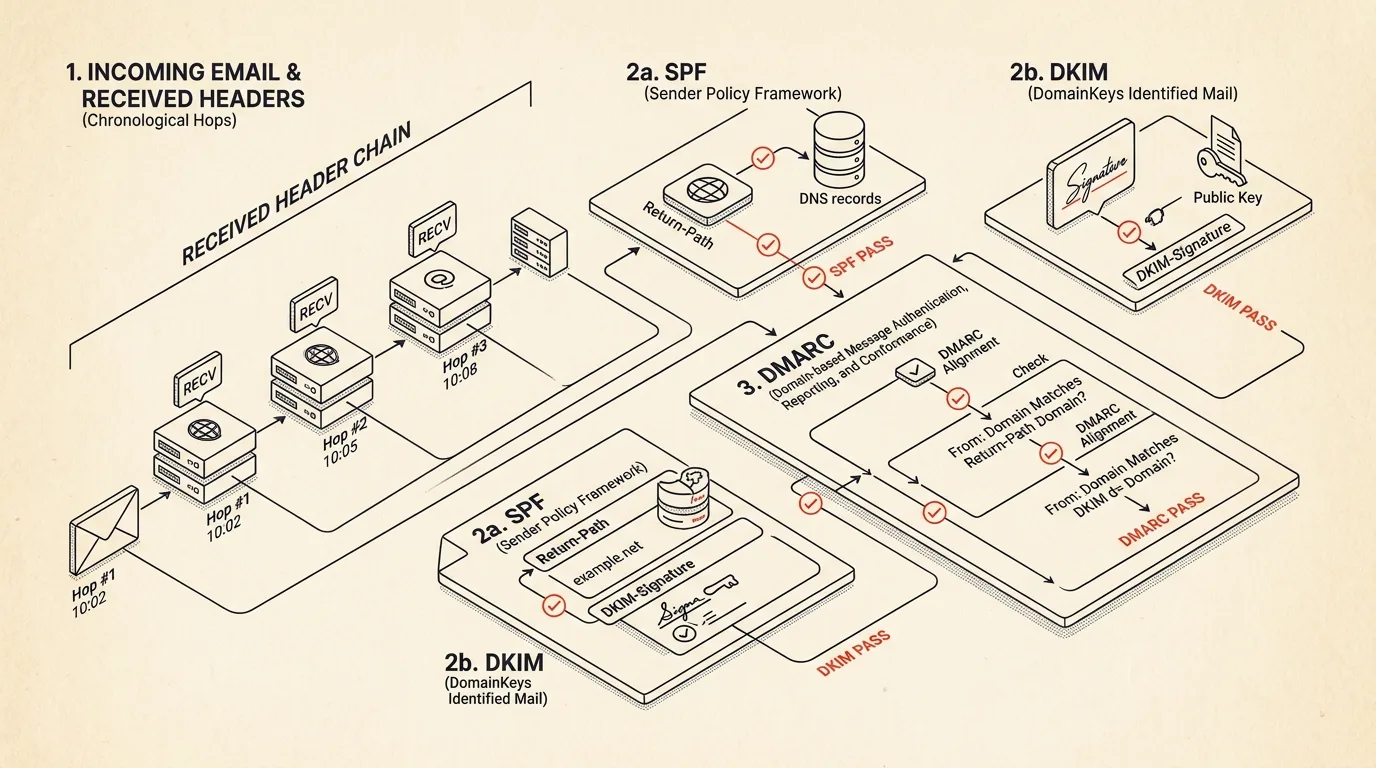
SPF answers one question: was the connecting IP allowed to send mail for the domain in the envelope sender? The envelope sender is what your server recorded in Return-Path, not what the reader sees. On any mail sent through a platform, that is usually a bounce address on the platform's own domain.
DKIM answers a different question: does the signature over these headers and this body verify against a public key published by the domain in the signature's d= tag? A message can carry several signatures, and a passing signature says nothing about who the message claims to be from.
DMARC is the part that ties either result back to the From: header — the only identity a reader ever sees. It passes when SPF or DKIM passed and the domain behind that pass aligns with the From domain. Strict alignment means an exact match; relaxed means the organizational domains match, so mail.brand.example aligns with brand.example.
That is why spf=pass next to dmarc=fail is not a contradiction. The SPF pass belonged to somebody else's domain.


Alignment is the whole game
When a DMARC failure lands on your desk, the useful question is not "did SPF pass" but "which domain did it pass for". Pull three values out of the headers:
- the domain in
From: smtp.mailfromfromAuthentication-Results, or the domain inReturn-Path- every
d=tag from a passing DKIM result
If none of them line up with the From domain, DMARC cannot pass no matter how many green results the header shows. This is also the fastest way to diagnose a broken sending setup: a brand that publishes p=reject and sends through a platform that never had its DKIM configured will fail every time, and the header shows exactly which of the two paths was expected to carry the alignment.
Reading the Received chain
Each server prepends its own Received: line, so the block is in reverse chronological order — the last hop is at the top and the origin is at the bottom. Reverse it and you have a timeline.
The gap between one server's stamp and the next is that hop's delay, and it includes queueing on the receiving side. A message that took four minutes usually spent them in exactly one place, and that place is where the investigation starts: greylisting, a rate limit, a content filter that pulled the message aside.
Two details are worth checking on every hop. The transport keyword — ESMTPS means TLS was negotiated, plain SMTP means it was not. And the timestamps themselves: if a hop is stamped earlier than the one before it, a server clock is wrong and every delay around it is meaningless.
What breaks on honest mail
Before treating a failure as an attack, rule out the two mundane causes.
Forwarding. A university or a personal alias that forwards to another mailbox re-sends the message from its own IP. SPF now describes the forwarder, not the author, and it will not align. DKIM normally survives forwarding, so an intact signature is what saves such a message — unless the forwarder also modifies it.
Mailing lists. Lists add a subject prefix and a footer. Both are inside the DKIM signature, so the hash no longer matches and DKIM fails. Combined with a rewritten envelope sender, the message loses both identities and fails DMARC despite nobody forging anything. List-Id and List-Unsubscribe in the header block are the giveaway, and it is worth checking whether the sending domain publishes p=reject, which is what turns this from a cosmetic failure into a bounced message.
Signals that mean forgery
When the mundane explanations do not fit, a handful of signals in the same header block point the other way:
- A display name containing an address.
"Support <[email protected]>" <[email protected]>renders in most clients as just Support, and the address a reader might check is text inside the name. This costs an attacker nothing and works remarkably well. Reply-Toon an unrelated domain. Legitimate for helpdesks, and also the standard setup when the goal is to capture the reply.- Punycode or mixed-script domains. An
xn--domain or a name mixing Latin with Cyrillic renders as a familiar brand in the client while resolving somewhere else entirely. - Bidirectional overrides in the subject or display name. Invisible Unicode controls reverse how a fragment renders, which is the classic way to disguise a name or a file extension.
- More than one
From:header. RFC 5322 allows exactly one. Filters and clients do not always pick the same one, and the mismatch is deliberate.
None of these is proof on its own. Several of them together, on a message that also fails alignment, is not a coincidence.
Doing it without pasting mail into a stranger's server
Header analysis is text parsing — it needs no account, no upload and no backend. That matters here more than for most tools, because a header block carries recipient addresses, internal hostnames, and often the internal IP layout of the organisation that received it.
The Email Header Analyzer does the whole pass in the browser: it unfolds and decodes every header, rebuilds the Received chain in chronological order with per-hop delays and TLS status, extracts the SPF, DKIM and DMARC verdicts, re-derives alignment from the identities rather than repeating the server's summary, and flags the spoofing signals above. Nothing leaves the page, and no DNS lookup is made — which is also its honest limitation: it reads the verdicts your receiving server already computed instead of re-verifying a signature it has no key for.
Related tools


Frequently asked questions
Why does a message show spf=pass but dmarc=fail?
SPF authenticates the envelope sender in Return-Path, which is often a bounce address on the sending platform's own domain. DMARC only accepts that pass if the domain lines up with the From header the reader sees. When an ESP sends from [email protected] on behalf of brand.example, SPF passes for the provider and DMARC still fails because the two identities are not aligned.
Which Authentication-Results header should I trust?
Only the one written by your own receiving infrastructure, which is normally the topmost instance. Any server in the path can add a header with that name, including the sender, so results recorded before the message reached your boundary prove nothing on their own.
Why did DKIM break after the message went through a mailing list?
Lists commonly add a subject tag or a footer to the body. Both are covered by the signature, so the hash no longer matches and DKIM fails. This is the most frequent innocent cause of a DMARC failure, and the Received chain will usually show the list server as an extra hop.
Can header analysis prove a message is genuine?
It can prove a message was authenticated by the receiving server and that the authenticated identity matches the visible sender. It cannot verify a DKIM signature after the fact without fetching the public key from DNS, and it cannot tell you whether an authenticated sender is honest — a phisher can perfectly authenticate their own lookalike domain.