How chmod Permissions Work: Bits, Directories, and Special Modes
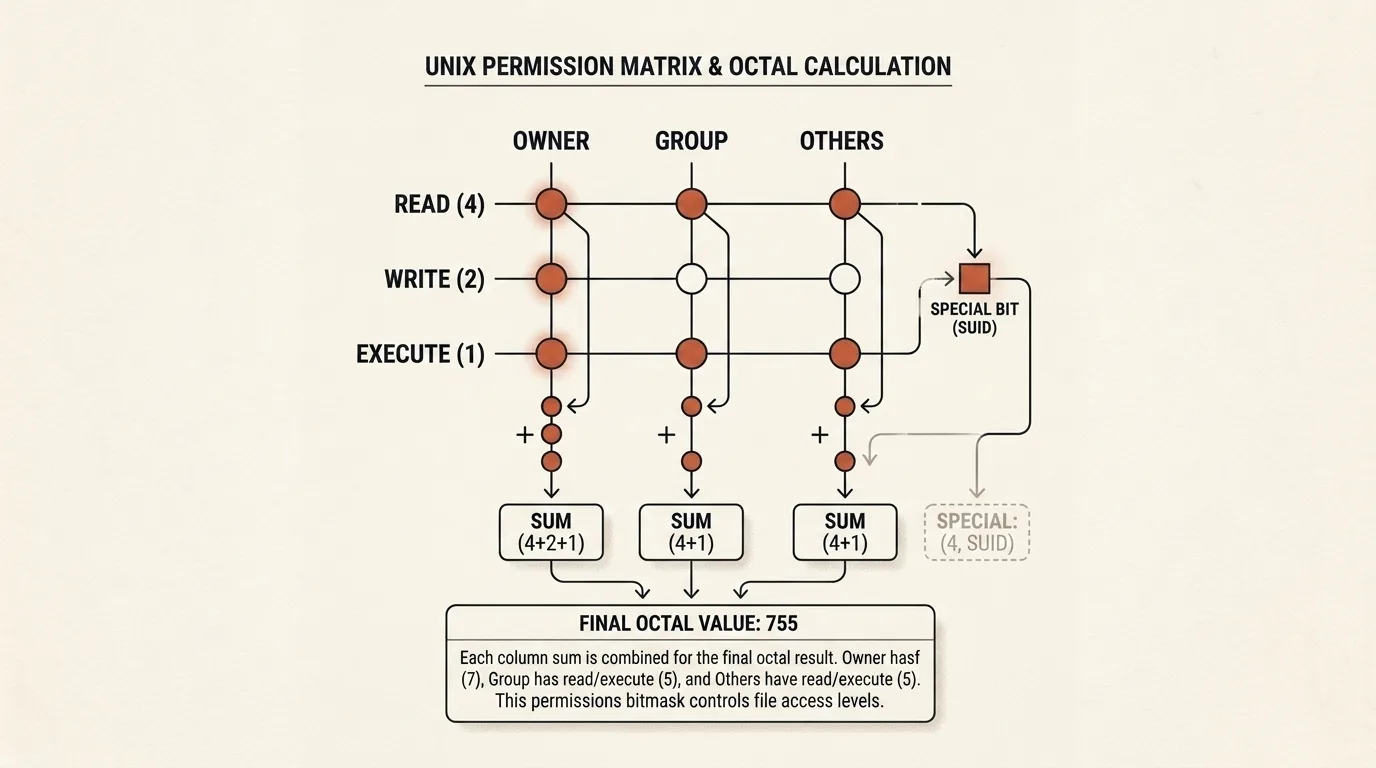
A command such as chmod 755 can look like a short numeric password that administrators are expected to memorize, but the number is only a compact bit mask. Three user classes receive three basic permissions each, while the type of object determines what those permissions allow in practice. The same mode can therefore be sensible for an executable and entirely inappropriate for a document containing secrets.
The modern model arrived in stages
The chmod command was already present in the first Unix manual dated November 3, 1971, although its permission model was not the one we use today. It distinguished the owner from everyone else, assigned separate read and write permissions to those two classes, and used a shared execute bit; there was no group rwx triplet yet. Later Unix editions added a group class, and by the Fourth Edition the stat manual described the familiar owner, group, and others sets.
It is therefore misleading to describe the current scheme as a complete design that Ken Thompson produced at a single moment in 1971. It grew with the Bell Labs multi-user system as its developers refined file ownership, collaboration, and controlled access to another user's data. The result remained simple enough for routine work while being general enough to outlive the original Unix by decades.
Three permission triplets, two notations
Every file has an owner and a group, and its basic permissions are divided into three classes: u for the owner, g for members of the file's group, and o for everyone else. The kernel chooses the applicable class from the process credentials and then checks that class's bits. Permissions do not accumulate across classes: when a process matches the owner, the owner triplet is used rather than searching group or others for a more favorable result.
The letters change meaning with the object type:
| Bit | Value | Regular file | Directory |
|---|---|---|---|
r | 4 | read the contents | list entry names |
w | 2 | modify the contents | create, remove, and rename entries |
x | 1 | execute as a program | search and traverse the directory |
The values are added separately for each class. Mode 755 consists of 7 = 4 + 2 + 1 for the owner and two fives, 5 = 4 + 1, for the group and others. The same mask can be written symbolically as u=rwx,go=rx, so chmod 755 app and chmod u=rwx,go=rx app set the same nine basic bits. Numeric notation is convenient when the complete final mode is known, while the symbolic operators +, -, and = explicitly add, remove, or replace selected permissions.
It also helps to separate a command operand from the output of ls -l. The string rwxr-xr-x displays an existing mode, but it is not itself a valid symbolic operand for chmod; a command uses an expression such as u=rwx,go=rx. A umask serves a different purpose as well: it restricts the initial mode when an object is created, whereas a later chmod with explicit user classes changes the existing bits.
Directory permissions describe different operations
Many permission mistakes start with reading a directory's bits as if it were a regular file. Read permission lets a process obtain a list of names, but without x it cannot normally traverse to those objects and inspect them. Write permission controls the directory entries and is generally paired with x so that entries can be created, renamed, and removed.
This distinction has a counterintuitive consequence: deleting a regular file primarily depends on the permissions of its parent directory, not on the file's own w bit. A user may be unable to alter a file's contents yet still remove its directory entry from a writable directory. Conversely, write access to a file does not make it removable from a protected directory. The Linux path resolution manual explains the search checks performed for every directory component.
That is why 777 cannot be judged without context. On a shared directory it lets everyone change the set of entries, while on a regular file it unnecessarily lets everyone modify the contents and attempt to execute them. Mode 755 reserves writes for the owner, but it is not a universal “correct value” either. A private key will commonly need 600, a team directory may require group writes, and a web application should be configured around the processes that actually read or change each path.
SUID and SGID affect a program's effective identity
Special bits occupy another octal digit before the basic permissions. A leading 4 selects SUID, 2 selects SGID, and the values can be combined; 4755, for example, means SUID plus the ordinary mode 755.
On an executable file, SUID temporarily makes the process's effective UID equal to the file owner's ID, while SGID does the equivalent for the file's group. This does not automatically mean “run as root”: elevated privileges appear only when the owner or group is privileged. Modern Linux also suppresses this identity transition in cases such as a nosuid filesystem, a process with no_new_privs, or an interpreted script. The exact conditions are documented in execve(2).
SUID's history began well before 1979. Dennis Ritchie filed a patent application for temporary effective-identity switching on July 9, 1973, while US Patent 4,135,240 was published on January 16, 1979. That publication date sometimes produces the mistaken claim that SUID first appeared in Seventh Edition Unix. The patent describes a broader idea: the owner of protected data supplies an intermediary program that runs with the owner's identity and exposes only the operations its author intended.
SGID developed another practical role on directories. New files inherit the directory's group, and newly created subdirectories inherit both its group and the SGID bit, which keeps group ownership consistent throughout a collaborative tree. Linux documents this behavior in inode(7).
The sticky bit changed jobs
In early Unix, the sticky bit asked the system to retain a program's text image in swap after it exited so that a later launch could load faster. This is where the name came from: the code effectively “stuck” to swap. Improvements in virtual memory made that optimization obsolete, and the same bit found a new purpose on shared writable directories.
On current Linux systems, a sticky directory restricts removal and renaming. An unprivileged process may perform those operations when it owns the file or the directory, which is why /tmp commonly uses mode 1777: everyone can write there, but one user cannot simply remove another user's temporary file. This rule concerns directory entries rather than the contents of an already open file; the GNU chmod manual calls it the restricted deletion flag.
Mode bits are not the whole access policy
Even a carefully chosen chmod mode describes only the base layer. The outcome can also depend on object ownership, ACLs, Linux capabilities, mount options, filesystem attributes, and mandatory access-control systems such as SELinux or AppArmor. Execute permission does not guarantee a successful launch either: the kernel still needs a supported program format, and reaching the file requires search permission on every parent directory.
A mode should therefore follow the actual access requirement rather than a memorized number. First decide who needs to read, modify, or execute the object, then account for whether it is a file or directory, and only then apply the mask.
Using Chmod Calculator accurately
Chmod Calculator builds a classic mode without requiring mental arithmetic. Its matrix lets you select r, w, and x for owner, group, and others, enable SUID, SGID, or the sticky bit separately, or use one of six presets as a starting point. The result is displayed in octal and ls -l style, alongside commands for a single file, a recursive tree change, and a basic symbolic mode.
Two limitations matter before copying a generated command. First, presets know nothing about the purpose of a particular path and are not security recommendations. Second, the generated symbolic command includes only ordinary rwx permissions. If a special bit is selected, use the octal command or add u+s, g+s, or +t yourself. A result such as rwsr-xr-x correctly displays SUID, but a command such as u=rwx,g=rx,o=rx will not set it.
Treat the recursive chmod -R variant with additional care because it changes an entire tree even though regular files and directories often need different modes. Inspect the target path and its contents first, then handle files and directories separately when the tree mixes both types.
Related tools


Frequently asked questions
Who created the Unix permission system?
The permission system developed alongside Unix rather than appearing in its modern form as one person's finished design. The first edition already distinguished an owner from non-owners, provided separate read and write permissions, and included shared execute and SUID bits. Groups and the familiar three rwx triplets arrived later.
What do chmod numbers mean?
Each of the three main digits adds 4 for read, 2 for write, and 1 for execute on a file or search on a directory. Thus 7 means rwx, 6 means rw-, and 5 means r-x. An optional leading digit controls special bits: 4 for SUID, 2 for SGID, and 1 for the sticky bit.
What is SUID?
SUID, or set-user-ID, changes a process's effective user ID to the executable file owner's ID when the file is run. It grants root privileges only when root owns that executable, and Linux may suppress the transition because of execution policy or filesystem settings.
What does the sticky bit do on a directory?
In a sticky directory, an unprivileged user cannot remove or rename someone else's entry merely because the directory is writable. The file owner, directory owner, and a privileged process can still do so. A common example is mode 1777 on /tmp.
How is chmod 777 different from 755?
Mode 777 grants read, write, and execute to all three classes, while 755 reserves write permission for the owner. On a directory, 777 normally lets everyone create and remove entries unless the sticky bit or another access-control mechanism intervenes. Deleting a regular file depends on its parent directory permissions, not on the file's own write bit.