Securing OAuth 2.0 Applications with PKCE (RFC 7636)
In the early days of OAuth 2.0 (RFC 6749), authorization code flows depended heavily on static client_secret strings stored on backend servers. However, as modern web architecture shifted towards Single Page Applications (React, Vue, Nuxt) and mobile clients, exposing secrets in client-side code created severe security risks.
OAuth 2.0's messy birth (2012)
OAuth 2.0 didn't arrive quietly. Eran Hammer, its lead author and editor, resigned from the working group in July 2012 — months before RFC 6749 was even published — and posted a blog titled "OAuth 2.0 and the Road to Hell." His complaint: the spec had grown "more complex, less interoperable, less useful, more incomplete, and most importantly, less secure" than OAuth 1.0, having dropped mandatory signatures in favor of bearer tokens and left too many details for each vendor to improvise. RFC 6749 shipped that October anyway, without his name on it. PKCE exists in large part to patch exactly the kind of gap that criticism predicted.
The Public Client Vulnerability
Public clients (browser SPAs, native iOS/Android apps) cannot keep secrets safe. End users can inspect JavaScript code or decompile mobile binaries to extract hardcoded client_secret keys.
Furthermore, malicious software (browser extensions or custom URI handlers on mobile devices) could intercept authorization codes returned to redirect_uri endpoints and exchange them for user access tokens.
How PKCE (RFC 7636) Resolves the Threat
Published in September 2015 by Nat Sakimura, John Bradley, and Naveen Agarwal, RFC 7636 wasn't originally written with SPAs in mind — its motivating scenario was native mobile apps. Two apps could register for the same custom URI scheme (myapp://callback), letting a malicious app intercept the authorization code meant for the legitimate one. PKCE (pronounced "pixy") closed that hole, and the same technique turned out to fit browser-based public clients just as well once the industry realized a client_secret embedded in JavaScript is no safer than one embedded in a mobile binary.
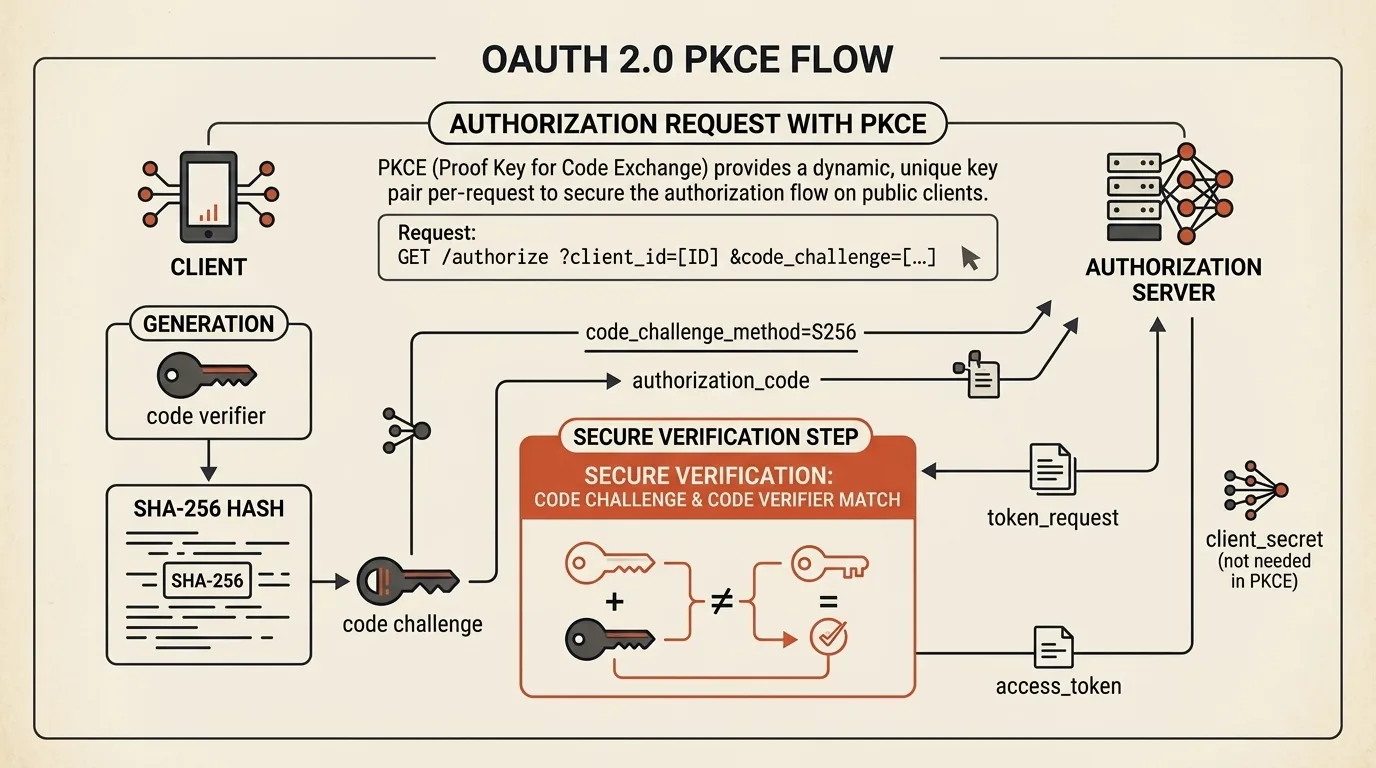
Proof Key for Code Exchange eliminates the need for static client secrets in public apps:
  Client Browser (SPA)                    Auth Server (IDP)
        |                                       |
        |---- (A) Authorization Request ------->|
        |     + code_challenge (S256)           |
        |                                       |
        |<--- (B) Authorization Code -----------|
        |                                       |
        |---- (C) Token Request --------------->|
        |     + code_verifier                   |
        |                                       |
        |<--- (D) Access Token -----------------|
        |                                       |
- Client-side Cryptographic Pair:
- The browser generates a random
code_verifier(43-128 chars). - It derives a
code_challenge:Base64URL(SHA256(code_verifier)).
- The browser generates a random
- Authorization Request:
- The client redirects the user to the IDP passing
client_id,redirect_uri,code_challenge, andcode_challenge_method=S256.
- The client redirects the user to the IDP passing
- Code Exchange:
- After user authentication, the authorization code is issued.
- The client sends a
POST /tokenrequest with the unhashedcode_verifier. - The server computes
SHA256(code_verifier)and verifies it against the initial challenge before releasing theaccess_token.
Features of Our OAuth PKCE Sandbox
Our OAuth 2.0 PKCE Generator & Auth Flow Sandbox empowers developers to debug authentication flows:
- S256 PKCE Pair Generator: Instant computation using the browser's native Web Crypto API (
window.crypto.subtle). - Auth URL Builder: Provider presets for Google OAuth 2.0, GitHub, Microsoft Entra ID, and Auth0.
- cURL Exchange Command Generator: Generate formatted terminal requests to test
POST /tokenendpoints. - Callback Response Parser: Extract
code,state, and error details from login response query strings.
Quick start: open the tool → generate a fresh PKCE pair → switch to Auth URL Builder → pick a provider preset → copy the URL and open it in a tab → after login, paste the callback URL into the Callback Parser → use the extracted code plus your code_verifier in the Token Exchange cURL tab.
Related Tools


Frequently asked questions
Why is PKCE (Proof Key for Code Exchange) required for SPAs?
Single Page Applications (SPAs) and mobile apps are public clients that cannot securely store a Client Secret. PKCE prevents Authorization Code Interception Attacks by dynamically creating a one-time cryptographic verifier and challenge pair for every login attempt.
What is the difference between plain and S256 code_challenge_method?
The plain method sends the raw code_verifier in cleartext as the challenge, which is vulnerable to network sniffing. The S256 method hashes the code_verifier with SHA-256 and encodes it with Base64URL — making it the required standard for RFC 7636.
What is the valid length of a code_verifier?
Per RFC 7636, a valid code_verifier string must be between 43 and 128 characters long, containing unreserved URL characters [A-Z, a-z, 0-9, -, ., _, ~].

Author
Alex RelFullstack Engineer
In commercial development since 2011 — over 15 years. Author of two SaaS products, TeleGo.io and LingvoHabit.com. The articles here come out of real client and product work.