From JSMin to Terser: What Minification Does to JavaScript
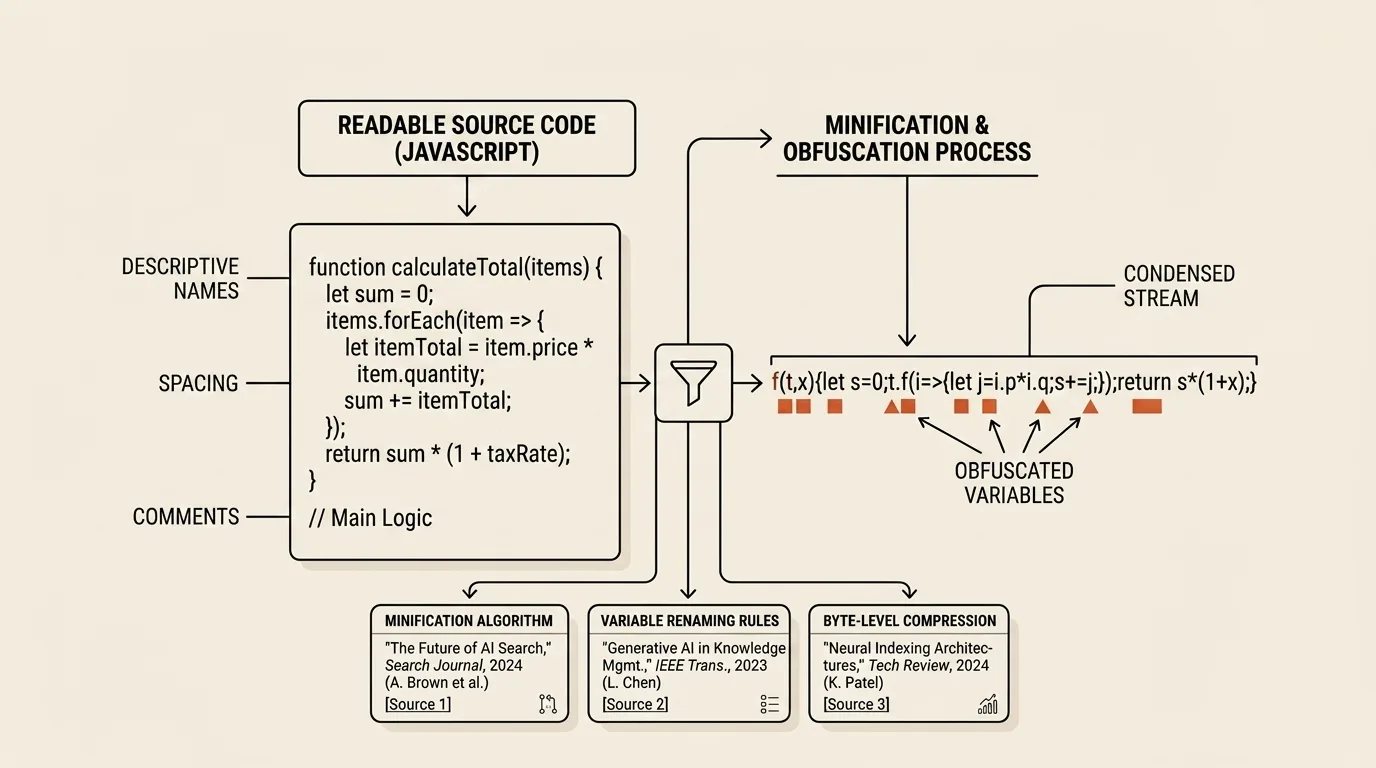
Readable JavaScript and JavaScript that is efficient to deliver do not have to look alike. Source code benefits from meaningful names, comments, and a structure that supports debugging; the browser only needs a program with the same observable behavior. Minification exploits that difference, but a modern production build does more than remove spaces. It separately decides which code enters the bundle, how the remaining expressions can be shortened, and how the resulting bytes should be compressed in transit.
JSMin removed only what the interpreter did not need
Douglas Crockford released JSMin in 2001 as a small streaming filter for JavaScript. It replaced comments and unnecessary whitespace without building a syntax tree or trying to rewrite the algorithm. JSMin recognized string and regular-expression literals and removed line breaks conservatively because automatic semicolon insertion makes some newlines significant.
That approach suited the early web: a prepared script could pass through a filter immediately before publication. Crockford estimated that a typical file became about half its original size, although the result naturally depended on how much commentary and formatting the source contained. His other qualification matters just as much. JSMin made the output harder to read as a side effect, but he did not describe that as obfuscation.
Source reduction already worked alongside transport compression. Crockford recommended applying gzip after JSMin because repeated identifiers and syntax still compress well once whitespace has gone. The distinction remains: a minified file is an executable JavaScript program, while a response sent with Content-Encoding: gzip or br must first be decoded by the browser.
ASTs turned character removal into program transformation
A streaming filter can inspect neighboring characters but knows little about relationships among expressions, variables, and scopes. In 2010, Mihai Bazon released UglifyJS, a parser, compressor, and beautifier written in JavaScript. By parsing source into an Abstract Syntax Tree, it could make language-level decisions such as shortening local names, folding constant expressions, combining statements, and dropping unreachable branches.
Its phases explain the vocabulary used by current tools. A parser turns text into an AST; a compressor searches for a shorter equivalent form; a mangler renames identifiers where the scope rules permit it; and a printer emits JavaScript with minimal syntactic overhead. UglifyJS2 was an almost complete rewrite of the first version and established this architecture in Node.js build tooling.
The Closure Compiler's compilation levels illustrate the same progression. Its simple mode removes whitespace and shortens local names, while advanced mode analyzes the program globally, removes unreachable code, and performs inlining. Aggressive analysis comes with stronger assumptions: external names, dynamic eval(), or an interface between compiled and uncompiled code can make a transformation unsafe. A minifier does not understand the program without limits; it proves particular rewrites inside a defined model.
New syntax required a parser that kept moving
Before ECMAScript 2015, much production output was transpiled into ES5 syntax. Arrow functions, let and const, classes, destructuring, template literals, modules, and constructs from later annual editions then became ordinary JavaScript. A minifier cannot safely rewrite an expression its parser cannot recognize, so language support became continuous maintenance rather than a problem solved once.
UglifyJS continued its ES5-oriented line, while uglify-es handled newer syntax for a time. When maintenance of that project stopped, Terser appeared in 2018. Its project documentation describes it as a fork of uglify-es that retained substantial API and CLI compatibility with UglifyJS 3 while targeting ES6 and newer JavaScript. The fork was not the result of one dramatic ES6 bug; it addressed the recurring need to maintain a changing grammar and the optimizations built on top of it.
Terser retained the familiar compress, mangle, and format stages. It can account for module semantics, preserve function and class names, emit source maps, and constrain risky transformations through options. Its place in current tooling reflects the way minification became one stage in a bundler pipeline, after source code had already passed through module resolution, transpilation, and other build steps.
A production pipeline reduces delivery in several different ways
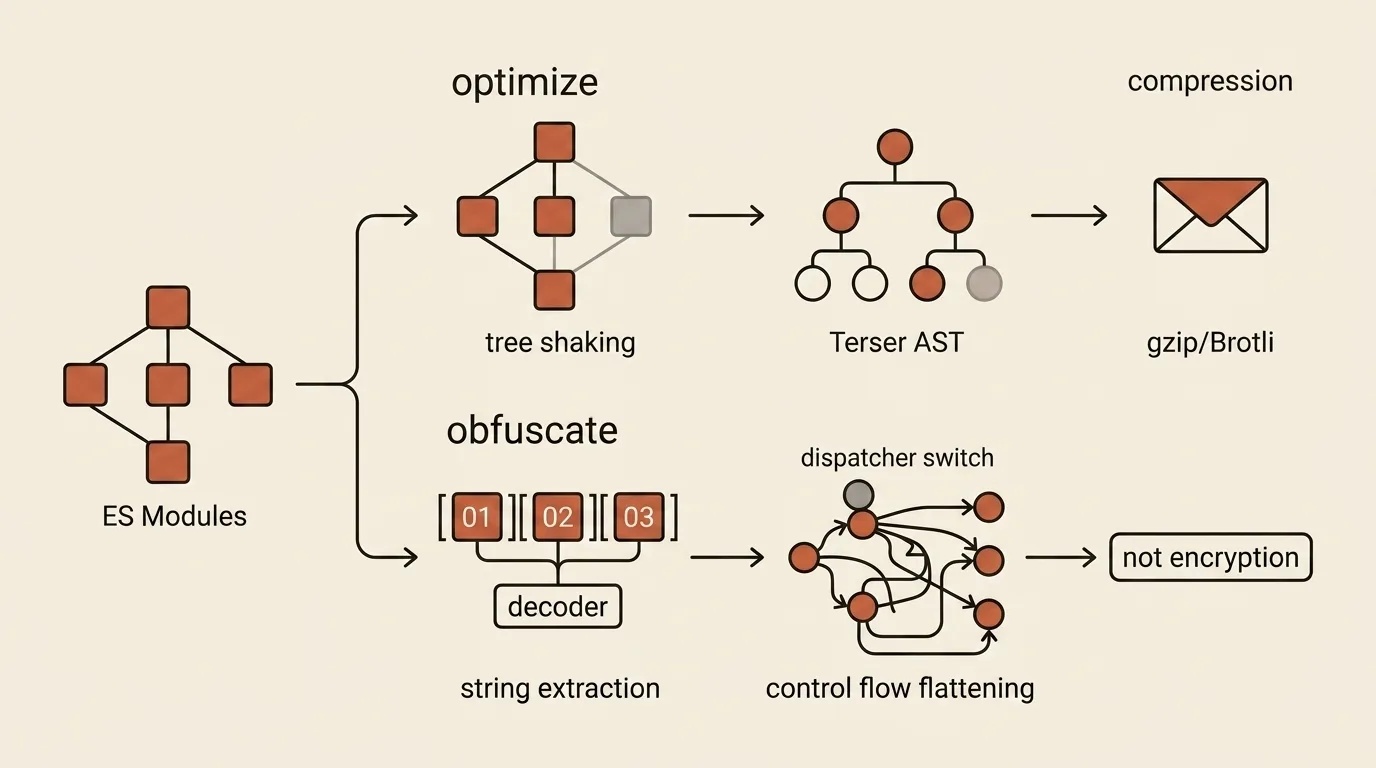
Tree shaking runs before minification and reasons about a module graph. Static import and export declarations let a bundler identify used exports, but side effects complicate the decision. A CSS import, event-handler registration, or global mutation cannot be discarded simply because no variable receives the import result. The webpack tree-shaking guide therefore distinguishes usedExports analysis from sideEffects declarations before handing the remaining code to a minifier.
Terser can then remove local dead code, simplify expressions, and shorten names. This is not project-wide tree shaking because a standalone minifier neither resolves dependencies nor knows the complete application graph. At the final network stage, the server applies gzip or Brotli. MDN's HTTP compression guide explains how browsers and servers negotiate the encoding through Accept-Encoding and Content-Encoding; the process reduces transmitted bytes without modifying the repository source.
These optimizations accumulate rather than duplicate one another. Tree shaking excludes unnecessary modules, minification shrinks the JavaScript that remains, and gzip or Brotli exploits repetition in the resulting text. A source map serves the opposite operational need by mapping a failure in the compact bundle back to an original file. Teams should make a deliberate decision about publishing maps with embedded source content or storing them separately, but minification should not make production failures impossible to investigate.
Obfuscation optimizes the cost of analysis, not file size
An obfuscator changes the objective. Identifier renaming, string arrays, literal splitting, and control-flow flattening are meant to obscure the program's intent even when the output becomes larger and slower. Dead-code injection deliberately adds instructions that execution does not need, putting it in direct conflict with minimum size.
Encoding strings with Base64 or RC4 does not turn a client bundle into a secret store. The decoder and required data must accompany the program so that it can recover the value at runtime. An analyst can stop execution after decoding, inspect a network request, or observe values in memory. A license decision, permanent private API key, or authorization check therefore cannot be entrusted solely to browser code.
Obfuscation can still help when the objective is narrower: remove obvious names, discourage casual copying of a small proprietary routine, or increase the time required for manual analysis. It remains a tradeoff. The JavaScript Obfuscator documentation warns that control-flow flattening slows execution and increases code size, while dead-code injection can expand it especially sharply. selfDefending and debugProtection also interfere with formatting and debugging, making work harder for the owner's team as well as an outside analyst.
What the tool actually does
The JS Minifier & Obfuscator loads bundled browser builds of Terser and JavaScript Obfuscator, then performs every transformation in the current tab without uploading the source. Minify mode separates compress and mangle, offers Safe, Default, and Aggressive presets, and exposes controls for unreachable-code removal, console.*, debugger, function and class names, top-level mangling, and module semantics.
The Safe label describes a more conservative set of options, not a proof that the output is safe. Aggressive mode may remove console.* and rename top-level symbols, so an enclosing page, test, or separate script can lose a reference it expects. The tool neither executes the output nor creates a source map; copied or downloaded code still needs validation in its target environment.
Obfuscate mode provides four presets and individual controls for string arrays, Base64 or RC4 encoding, string splitting, control-flow flattening, dead-code injection, number expressions, global identifier renaming, selfDefending, and debugProtection. The interface warns that High increases output size and runtime cost. Its displayed comparison measures raw UTF-8 bytes before and after transformation, not gzip or Brotli transfer size.
This is a tool for one supplied JavaScript fragment. The Module flag tells Terser how to interpret that input, but it does not turn the page into a bundler: imports are not resolved, no dependency graph is built, and project tree shaking does not occur. The experiment can help select parameters, while the final production transformation should remain a reproducible pipeline stage alongside tests, source maps, and HTTP compression.
Related tools


Frequently asked questions
Who created JSMin, and what did it do?
Douglas Crockford released JSMin in 2001. The streaming filter removed comments and unnecessary whitespace while conservatively preserving line breaks that JavaScript might interpret as statement boundaries. JSMin did not build an AST or rename variables, and it was explicitly distinguished from an obfuscator.
How is Terser different from UglifyJS?
Mihai Bazon released UglifyJS in 2010 as a JavaScript parser, compressor, and mangler written in JavaScript. As ECMAScript syntax moved well beyond ES5, the uglify-es branch appeared but later stopped being maintained. Terser began in 2018 as a compatible fork of uglify-es for modern JavaScript and continued its AST transformation model.
How do minify, compress, and mangle differ?
Minify describes the overall goal of making the program text smaller. In Terser terminology, compress rewrites expressions and removes code it can prove unnecessary, mangle shortens eligible identifier names, and format prints the resulting AST with minimal syntax. Each stage must preserve observable behavior under its documented assumptions.
Are tree shaking and minification the same process?
No. Tree shaking analyzes an ES module graph and excludes unused exports or entire modules while accounting for side effects. A minifier works on the code that remains, although it may then remove additional local expressions and unreachable branches. The two stages complement each other.
Does minification replace gzip or Brotli?
No. Minification creates a smaller JavaScript file that the browser can execute directly. gzip and Brotli encode bytes for HTTP transfer, and the browser restores the content before parsing it. A production pipeline normally bundles and minifies first, then serves the result with gzip or Brotli.
Can obfuscation hide an API key or password?
A secret cannot be reliably hidden in client-side JavaScript. The browser needs the code, decoder, and data required to run the program, so the user can inspect them as well. Obfuscation may slow down analysis, but permanent keys, trusted checks, and privileged operations belong on a server.
Can minification or obfuscation break a program?
Yes, when a transformation violates an implicit contract. Dynamic eval, Function.name access, external references to global names, serialized functions, and code with significant side effects all require care. Transformed output needs the same tests used for any other production build.

Author
Alex RelFullstack Engineer
In commercial development since 2011 — over 15 years. Author of two SaaS products, TeleGo.io and LingvoHabit.com. The articles here come out of real client and product work.