The Comprehensive .htaccess & mod_rewrite Guide for Apache
The .htaccess (Hypertext Access) file is one of the most versatile tools available to developers and system administrators running the Apache HTTP Server. It enables fine-grained control over URL redirects, security policies, browser caching, and routing rules on a per-directory basis.
One engineer's gift to Apache (1996)
mod_rewrite — the module every one of these rules depends on — was written by a single developer, Ralf S. Engelschall, in April 1996, who donated it to the Apache Software Foundation in July 1997. It wasn't his only contribution: two years later he also built mod_ssl, porting Ben Laurie's Apache-SSL patches so Apache could speak HTTPS at all. The two modules that make almost every .htaccess file on the internet possible — rewriting and encryption — trace back to the same person.
URL Rewriting Engine: mod_rewrite
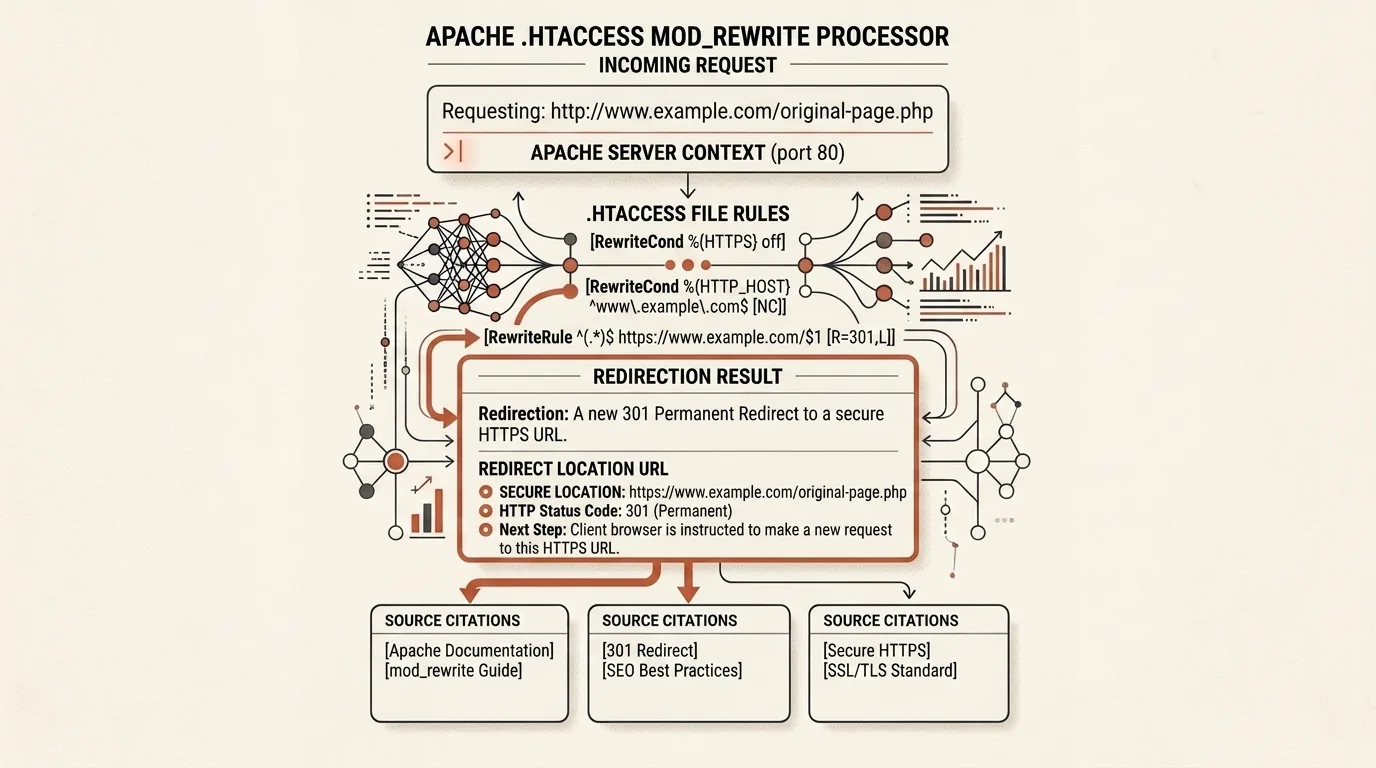
At the core of .htaccess lies mod_rewrite — a regular expression URL manipulation engine. It executes condition chains (RewriteCond) followed by action rules (RewriteRule):
RewriteEngine On

# Force HTTPS 301 Redirect
RewriteCond %{HTTPS} off
RewriteRule ^ https://%{HTTP_HOST}%{REQUEST_URI} [L,R=301]

# Hide .php File Extensions
RewriteCond %{REQUEST_FILENAME} !-d
RewriteCond %{REQUEST_FILENAME}\.php -f
RewriteRule ^(.*)$ $1.php [L]
Flags in square brackets control execution flow:
[L](Last): Stop evaluating subsequent rules if current rule matches.[R=301]: Emit an HTTP 301 Moved Permanently response to the client.[NC](No Case): Perform case-insensitive regex matching.
Security & Performance Core
1. Disable Directory Listing (Options -Indexes)
If an index file is absent from a folder, Options -Indexes prevents Apache from rendering raw directory contents, serving a 403 Forbidden response instead.
2. Protect Sensitive Files
Environment configuration files (.env, .git, .htaccess) often hold database passwords and API tokens:
<FilesMatch "^\.|\.env$|\.git">
    Order allow,deny
    Deny from all
</FilesMatch>
3. Compression and Browser Caching
Modules mod_deflate and mod_expires compress text resources with Gzip and set standard Cache-Control / Expires headers:
<IfModule mod_deflate.c>
    AddOutputFilterByType DEFLATE text/html text/css application/javascript application/json
</IfModule>
Features of Our .htaccess Builder
Our .htaccess Generator & Rewrite Rule Constructor produces clean, battle-tested Apache configurations:
- HTTPS & Canonical Domain Rules: One-click toggles for HTTPS 301 redirects and
www/non-wwwcanonical URL normalization. - Clean Extensionless URLs: Hide
.phpand.htmlextensions automatically. - Custom 301 Redirect Table: Interactive table for mapping legacy paths
/old-url➔/new-url. - Security & Caching Directives: Toggles for
Options -Indexes,.env/.gitblocking,mod_deflateGzip, andmod_expiresheaders. - Direct File Download: Export formatted
.htaccessfiles straight to your machine.
Quick start: open the tool → pick a stack preset (WordPress, Joomla, Laravel, or General) → review the Security & Firewall tab → add any custom redirects you need → copy or download the file → upload it to your site's document root.
Related Tools


Frequently asked questions
What is an .htaccess file and how does Apache use it?
.htaccess (Hypertext Access) is a directory-level configuration file for the Apache HTTP Server. It allows developers to customize server behavior (URL rewrite rules, headers, access control) per directory without modifying the global httpd.conf file or restarting Apache.
What is the difference between a 301 and a 302 redirect?
A 301 (Moved Permanently) redirect informs search engines and browsers that a URL has permanently moved to a new destination, transferring 90-99% of SEO link equity. A 302 (Found / Temporary) redirect indicates a temporary relocation.
Why is Options -Indexes recommended?
By default, if no index file (index.html, index.php) exists in an Apache directory, the server displays a public file list. Options -Indexes disables directory browsing and returns a 403 Forbidden status, protecting source files and database backups.

Author
Alex RelFullstack Engineer
In commercial development since 2011 — over 15 years. Author of two SaaS products, TeleGo.io and LingvoHabit.com. The articles here come out of real client and product work.