Content Security Policy (CSP 3): XSS Defense Guide
Cross-Site Scripting (XSS) consistently ranks among the most critical vulnerabilities in the OWASP Top 10. No matter how secure a backend API is, a single unescaped user input can allow an attacker to inject malicious JavaScript and hijack user sessions.
The browser's primary defense line against XSS is Content Security Policy (CSP).
Born at Mozilla (2004–2011)
The idea of a page declaring its own content restrictions goes back to at least 2007, floated independently by Mozilla's Gervase Markham and security researcher Robert "RSnake" Hansen. Brandon Sterne, then Mozilla's security program manager, turned the idea into working code with engineer Sid Stamm, and their pre-spec implementation shipped quietly in Firefox 4 in March 2011 under a different, now-obsolete header: X-Content-Security-Policy. Sterne even built a bookmarklet that scanned a live page and suggested a starting policy for it.
Chrome followed a few months later with its own prefixed header, X-Webkit-CSP. The two implementations didn't agree on syntax, so when the W3C published its first Content Security Policy 1.0 working draft in November 2011, the standardized version differed from what either browser had already shipped — Firefox didn't catch up to the plain Content-Security-Policy header and CSP 1.0 directive syntax until Firefox 23, in 2013.
How Browsers Enforce CSP
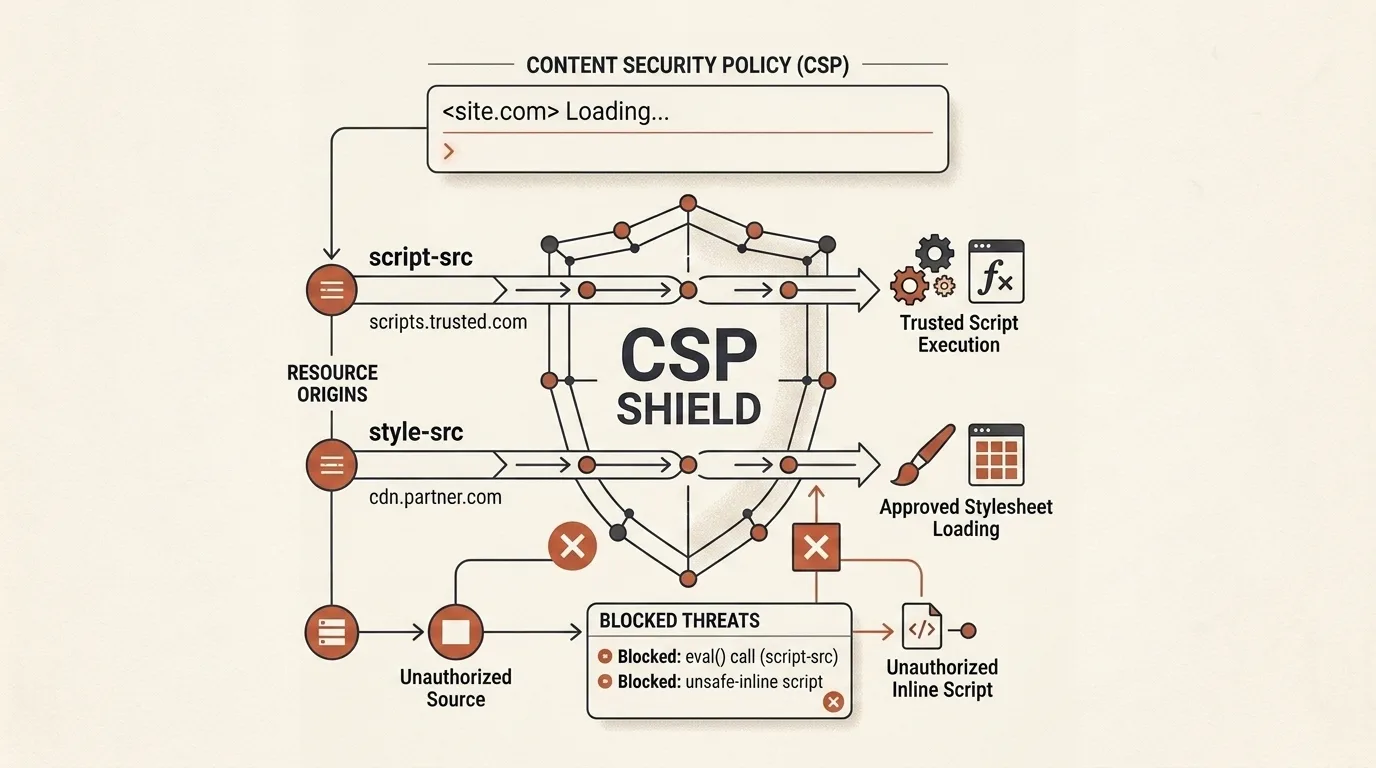
When a browser receives the Content-Security-Policy header, it enforces a strict allowlist. For every resource (JS file, stylesheet, image, WebSocket connection), the browser verifies the request origin against declared rules:
Content-Security-Policy: default-src 'self'; script-src 'self' https://cdn.jsdelivr.net; object-src 'none'; frame-ancestors 'none'; upgrade-insecure-requests;
If a script attempts to load from an unauthorized domain or execute an inline block when unsafe-inline is disallowed, the browser blocks execution immediately and logs an error to the developer console:
Refused to execute inline script because it violates the following Content Security Policy directive: "script-src 'self'".
Essential CSP 3 Directives
default-src: Fallback policy for resource types without explicit directives.script-src: Controls valid sources of JavaScript ('self','nonce-...','sha256-...').style-src: Controls valid sources of CSS stylesheets.img-src: Authorized image sources ('self',data:,https:).connect-src: Restricts target URLs forfetch(),XMLHttpRequest,WebSocket, andEventSource.object-src: Restricts browser plugins (Flash, Java). Should always be set to'none'.frame-ancestors: Replaces legacyX-Frame-Optionsto prevent Clickjacking attacks by controlling which sites can embed the page in an<iframe>.base-uri: OWASP-recommended directive that restricts what a<base>tag is allowed to point to, closing off an easy way to hijack every relative URL on the page.form-action: OWASP-recommended directive limiting where<form>submissions can go, so an injected form can't quietly ship a password to another domain.
Critical CSP Configuration Pitfalls
- Including
'unsafe-inline'inscript-src: Leaves the application open to inline XSS execution. - Including
'unsafe-eval': Permits dynamic string evaluation viaeval()andFunction(). - Wildcard
*rules: Allowing all origins undermines the security boundaries of CSP.
Features of Our CSP Builder
Our Content Security Policy & Header Builder simplifies crafting secure header policies:
- Quick Directive Chips: Toggle
'self','unsafe-inline',https:,data:, and'none'with a single click. - Automated OWASP Audit: Real-time safety score (A+, B, F) with warning flags for risky directives.
- Security Suite Integration: Add HSTS (
Strict-Transport-Security),X-Frame-Options: DENY, andX-Content-Type-Options: nosniff. - Multi-Format Exporter: Generate directives for Nginx (
add_header), Apache (Header set), HTML<meta>, and HTTP response headers.
Quick start: open the tool → keep the 'self' defaults → add any CDN or font origins you actually use with the chips → check the score badge → switch export format to match your server (Nginx, Apache, or a <meta> tag) → copy and deploy.
Related Tools


Frequently asked questions
What is Content Security Policy (CSP)?
Content Security Policy is an HTTP response header (or HTML meta tag) that instructs the browser which origins are allowed to load and execute resources (scripts, styles, images, frames, fonts).
Why is 'unsafe-inline' dangerous in script-src?
'unsafe-inline' allows the browser to execute inline <script> tags and inline event handlers (like onclick). If your site has a Cross-Site Scripting (XSS) vulnerability, 'unsafe-inline' neutralizes CSP protection completely.
What is the difference between default-src and script-src?
default-src acts as a fallback for directive types that are not explicitly defined. If script-src or style-src is omitted, the browser falls back to the rules in default-src.

Author
Alex RelFullstack Engineer
In commercial development since 2011 — over 15 years. Author of two SaaS products, TeleGo.io and LingvoHabit.com. The articles here come out of real client and product work.