What a Browser Checks in a TLS Certificate
The phrase “SSL certificate” has outlived SSL itself. A modern browser connects with TLS, while the server presents an X.509 certificate as part of proving its identity. That certificate neither makes the website honest nor encrypts the entire conversation by itself. During the TLS handshake, it helps bind the server name to a public key; the two parties then derive session keys for efficient symmetric protection of application data.
It is easier to understand a certificate when it is treated as one component of a system rather than a collection of mysterious fields. TLS provides the protected channel, X.509 defines the credential's structure, certificate authorities connect credentials into a chain, and the browser decides which roots to trust and whether the website name matches the names in the certificate.
From Netscape SSL to TLS
Netscape released SSL 2.0 in 1995 to protect data travelling between a browser and a web server from observation and modification in transit. Serious flaws emerged, and SSL 3.0 followed in 1996 with a substantially revised handshake and cryptographic design.
The IETF took the next step. In January 1999, it published TLS 1.0 as RFC 2246, using SSL 3.0 as a foundation but changing it enough that the two protocols did not interoperate directly. TLS 1.1, TLS 1.2, and TLS 1.3 followed. Older versions were retired in parallel: SSL 2.0 was prohibited in 2011, SSL 3.0 in 2015, and TLS 1.0 and 1.1 were formally deprecated in 2021.
In current TLS 1.3, the server is always authenticated and the client can be authenticated when required. The handshake chooses cryptographic parameters, authenticates the server, and establishes shared secret material; application records are then protected with keys derived from that secret. The certificate is therefore central to trusting the server's key and identity, but it is not the whole of TLS.
How X.509 joined a key, a name, and an issuer
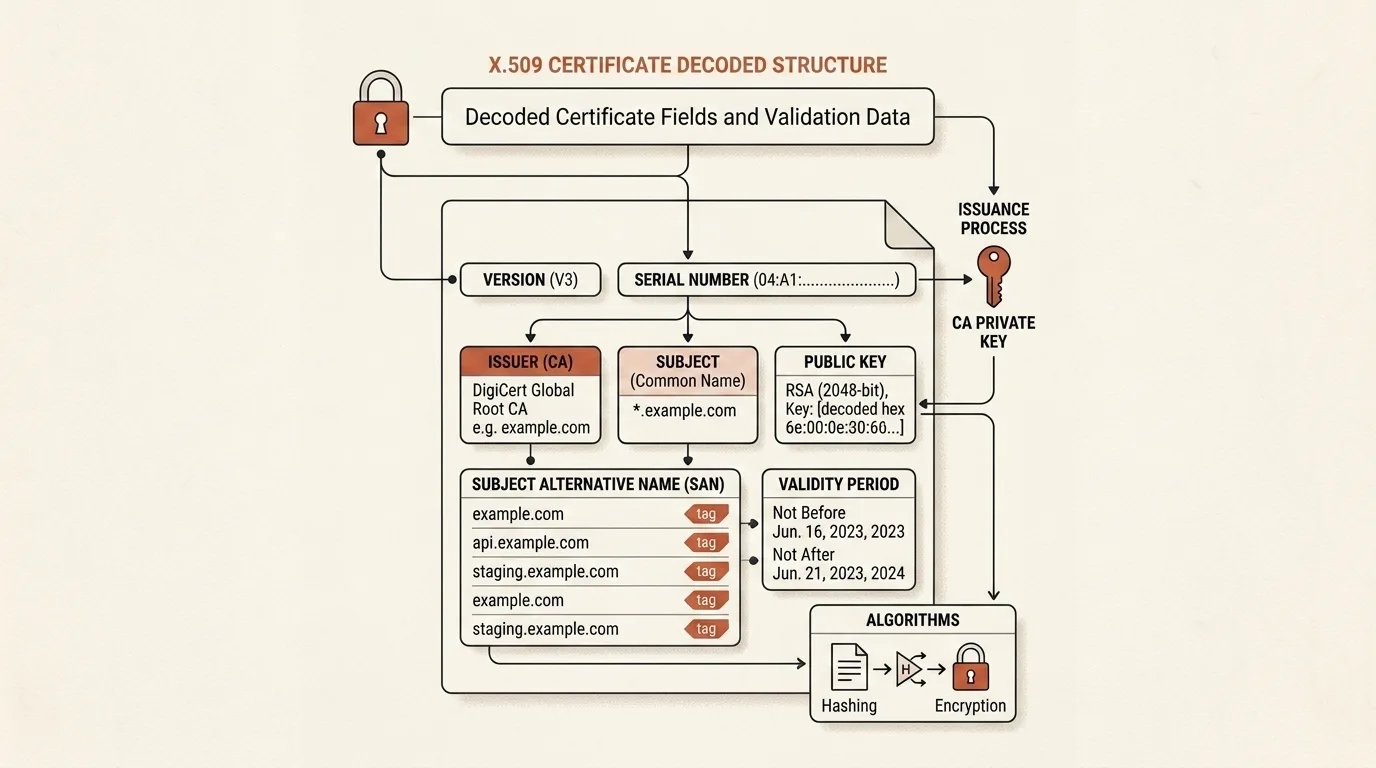
The first edition of X.509 appeared in 1988 as the Authentication Framework for the X.500 directory, years before the popular web. The internet later gave that format a more specific PKI profile, currently documented in RFC 5280. A certificate carries a serial number, subject and issuer information, a validity interval, a public key, a signature algorithm, and extensions such as Subject Alternative Name.
SHA-256 and SHA-1 fingerprints are not stored certificate fields. Software computes them by hashing the exact DER-encoded bytes, providing a convenient way to identify and compare a certificate. Displaying a SHA-1 fingerprint also does not mean that the certificate was signed with SHA-1 or that SHA-1 is suitable for new cryptographic designs; the signature algorithm is a separate field.
PEM is not a different kind of certificate either. It is a textual envelope with BEGIN CERTIFICATE and END CERTIFICATE labels around a Base64 encoding of the binary DER representation. This form is convenient in configuration files and messages, but it adds no encryption. A public certificate is designed to be shared, whereas its private key must never be published or pasted into an untrusted service.
Trust is a path, not a single field
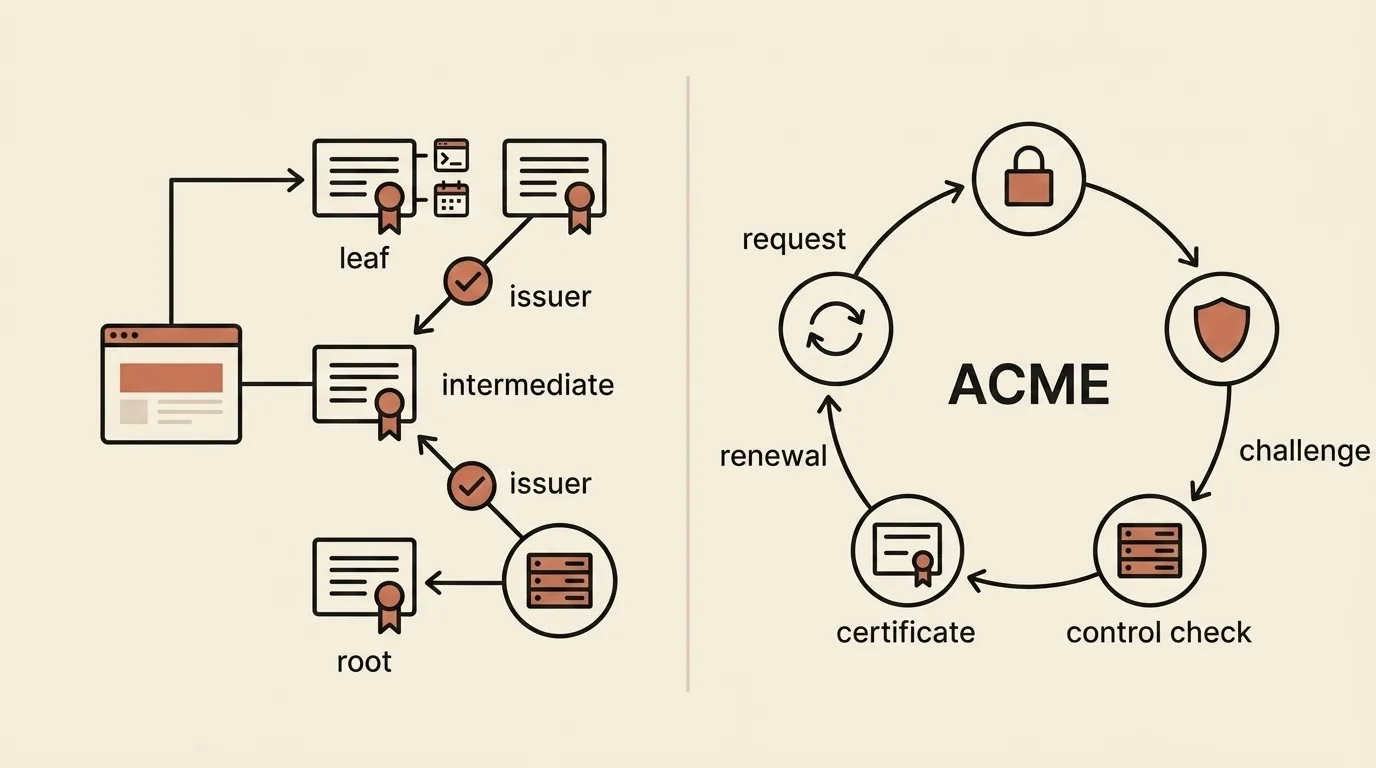
A server certificate, also called an end-entity or leaf certificate, is usually signed by an intermediate certificate authority. That intermediate certificate leads towards a root. The server sends the leaf and the necessary intermediates, while the browser tries to construct a path to a root already present in the browser's or operating system's trust store.
The root is trusted because local policy placed it in that store, not merely because it is self-signed. During path validation, the client checks certificate signatures and constraints along the path, validity intervals, and rules governing how keys may be used. It separately matches the requested website name against the identifiers in the leaf certificate's SAN. Successfully parsing a PEM block proves only that its structure can be read, not that the entire validation process would succeed.
Why the server name belongs in SAN
Common Name was not designed specifically for web domains. It is one attribute within an X.509 subject's distinguished name. Early HTTPS clients used it for the server name, but RFC 2818 had already required clients to prefer a dNSName in SAN when present and called Common Name fallback deprecated in 2000.
The change became enforceable in stages. The CA/Browser Forum Baseline Requirements that took effect on July 1, 2012 required publicly trusted certificate authorities to include SAN in server certificates. RFC 9525, published in 2023, states the modern rule more directly: a TLS server identity is represented by an identifier in SAN, while Common Name is no longer an acceptable substitute.
SAN can contain one name, several names, IP addresses, or a limited wildcard such as *.example.com. Merely finding an entry is not enough because a client still needs to match it correctly against the address the user opened. That wildcard covers www.example.com, for example, but not an arbitrary number of nested levels.
Let’s Encrypt automated the certificate lifecycle
The Internet Security Research Group was incorporated in May 2013, Let’s Encrypt was publicly announced in November 2014, and the service began issuing certificates in 2015. Removing the purchase price was only part of its purpose. Automation was fundamental, allowing a site operator to avoid manually ordering a certificate, proving control of the domain, and repeating the procedure shortly before every expiration.
ACME makes that workflow possible. A client creates an account and an order, the certificate authority offers a challenge, and the client proves control through HTTP or DNS. After successful validation, it submits a request containing the public key, retrieves the certificate, and can repeat the cycle ahead of renewal. ACME became RFC 8555 in 2019, so the protocol is not exclusive to Let’s Encrypt or to a single client implementation.
Free issuance certainly removed a barrier, but the lasting operational change is broader: a short-lived certificate can now be maintained by routine server automation instead of being a document that an administrator remembers to replace once a year.
What SSL Decoder shows
The SSL & X.509 Decoder runs locally in the browser and parses a pasted PEM certificate. It displays the X.509 version, serial number, Subject and Issuer, start and expiration dates, signature algorithm, public-key details, and the SAN entries it recognizes. It also computes SHA-256 and SHA-1 fingerprints from the binary DER.
The tool is useful for quickly reading a certificate from a configuration file, inspecting its list of names, or comparing a fingerprint with a published value. Paste the block from BEGIN CERTIFICATE through END CERTIFICATE; none of its contents are sent to a server.
The decoder reads only the first certificate in the pasted block and does not validate a live connection. It does not construct a path to a trusted root or verify cryptographic signatures, revocation, wildcard rules, key purpose, or the match between SAN and a particular hostname. Its time badge is based on the expiration date and is not a complete validity check. In short, the tool reveals what is inside a certificate, while a TLS client must make the final trust decision in the context of an actual connection.
Related tools


Frequently asked questions
How is SSL different from TLS?
SSL was Netscape's early protocol for protecting a connection. TLS 1.0, published by the IETF in 1999, was based on SSL 3.0 but was not fully interoperable with it. Secure web connections now use TLS, although terms such as “SSL certificate” and “SSL Decoder” remain common in interfaces and documentation.
What are X.509 and a certificate chain?
X.509 defines the structure of a certificate that binds a public key to a name and an issuer. A website certificate is normally signed by an intermediate certificate authority, which connects to a root certificate trusted through a browser or operating system store. Checking signatures and constraints along that path is called certificate path validation.
Why is a domain in SAN rather than Common Name?
Common Name is a general subject-name attribute that browsers once used as a fallback location for a server name. RFC 2818 already gave priority to dNSName in SAN and deprecated Common Name fallback in 2000. The CA/Browser Forum made SAN mandatory for publicly trusted certificates in 2012, while the current RFC 9525 no longer treats Common Name as a valid server identity.
What did Let’s Encrypt and ACME change?
Let’s Encrypt made publicly trusted certificates available without a fee, but automation was just as important. An ACME client can create an order, prove control of a domain, submit a certificate request, retrieve the certificate, and repeat the process for renewal. A certificate therefore became part of routine server automation instead of a purchase followed by a manual annual procedure.
Can SSL Decoder prove that a certificate is trusted?
No. The decoder displays the contents of the first pasted certificate and computes its fingerprints, but it does not build a path to a trusted root or check signatures, revocation, key purpose, and the match between SAN and a requested hostname. Even its time status is based only on the expiration date, so the tool is a structure inspector rather than a complete TLS certificate validator.

Author
Alex RelFullstack Engineer
In commercial development since 2011 — over 15 years. Author of two SaaS products, TeleGo.io and LingvoHabit.com. The articles here come out of real client and product work.