From CIE XYZ to OKLCH: Making Color More Perceptual
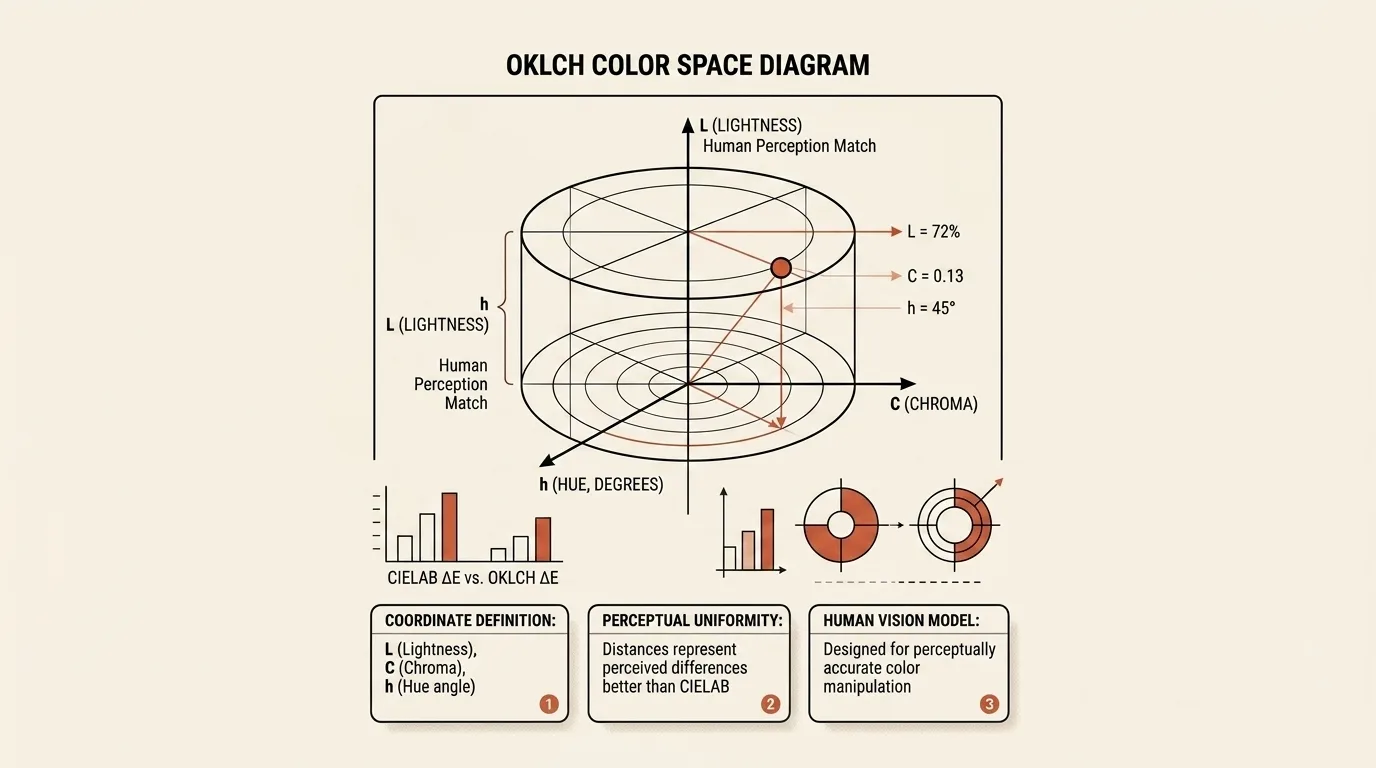
HEX, RGB, HSL, and OKLCH are not competing to become the one correct way to describe color. They were created for different jobs: RGB controls the contribution of display channels, HSL makes manual selection inside an RGB gamut easier, and perceptual models try to connect numerical changes with what an observer notices. Confusion begins when a convenient coordinate is mistaken for a physical measurement or a promise of identical visual results.
CIE XYZ established a common measurement system
By the early twentieth century, colors could already be reproduced by mixing light, but laboratories and manufacturers needed a common language that was not tied to one particular set of red, green, and blue phosphors. Color-matching experiments provided the foundation: an observer adjusted a mixture of three stimuli until it visually matched the color being studied.
In 1931, the International Commission on Illumination standardized those results as the CIE standard observer and the XYZ system. The current CIE standard for colorimetric observers still includes the 1931 color-matching functions for a small field of view. X, Y, and Z describe a measured stimulus independently of a specific monitor, with the Y component connected to photometric luminance.
XYZ solved repeatable measurement, but it did not promise that equal geometric distances between points would appear as equal color differences. A small numerical movement could be obvious in one region and barely visible in another. Print, textile, paint, and photographic quality control needed a model in which the magnitude of an error corresponded more closely to observation.
CIELAB made distance more closely resemble visible difference
By the 1970s, several nominally uniform color spaces and color-difference methods were in use. The CIE introduced CIELAB in 1976 to unify that diverse practice. As the current CIE 1976 Lab* standard explains, a simple Euclidean distance in the new coordinates was intended to approximate the magnitude of a perceived color difference.
CIELAB uses lightness L* and two opponent axes: a* runs from green to red, while b* runs from blue to yellow. Its nonlinear transformation of XYZ makes steps far more meaningful to human vision than distances between raw RGB components. This is why Lab became an important intermediate space in measurement and color management.
LCH does not replace Lab with a different theory of vision. It expresses the same points in cylindrical coordinates, replacing a* and b* with the distance from the neutral axis, called Chroma, and an angular Hue. This representation is convenient when the goal is to lighten a color, reduce its colorfulness, or rotate its hue without editing two opponent coordinates separately.
“Uniform” has always meant an approximation, however. CIELAB contains regions of unequal sensitivity, and changing colors near saturated blue can introduce an unwanted shift toward purple. More elaborate difference formulas such as CIE94 and CIEDE2000 improved specific comparisons, but they also added complexity and did not make interpolation in Lab ideal for graphics.
Why HSL is useful even though its Lightness is not perceptual
Computer graphics developed alongside colorimetry but faced a different problem. Artists and video-system operators found it awkward to choose colors by directly changing three RGB channels, so the 1970s brought transformations that organized the RGB cube around Hue, Saturation, and either Value or Lightness. The 1978 paper Color Gamut Transform Pairs described such models as alternative representations of an RGB monitor gamut that were useful in painting programs.
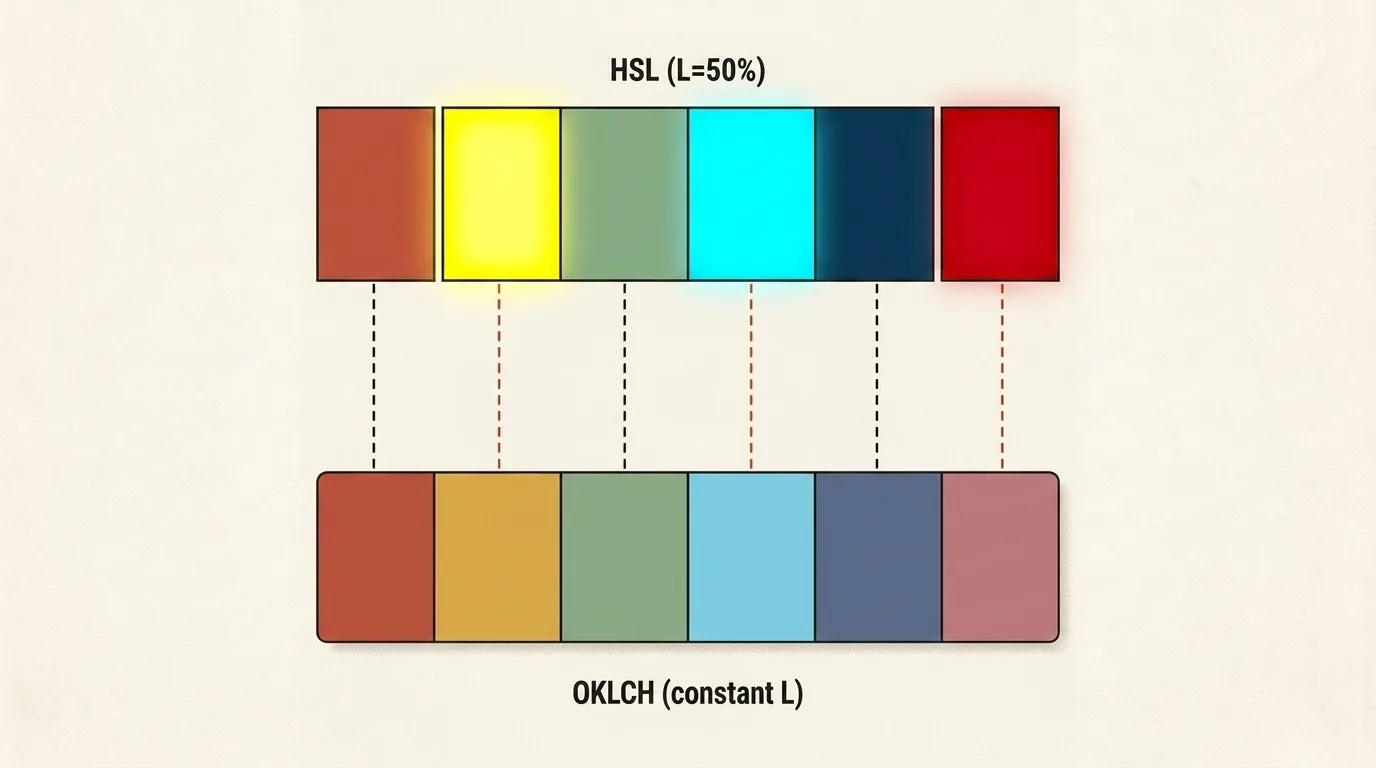
That history explains both the value and the limitation of HSL. Hue can be rotated around a circle, Saturation reduced toward gray, and Lightness adjusted to produce lighter or darker variants without manually mixing channels. HSL Lightness, however, is derived from the extremes of gamma-encoded RGB components and does not model the eye's varying sensitivity across the spectrum. Pure blue and pure yellow therefore both have L=50%, even though yellow appears much lighter.
CSS Color 4 explicitly describes HSL as more intuitive than RGB while also noting that its hues are unevenly spaced and that changing Hue alters visual lightness. HSL does not “lie”; it offers convenient control over sRGB geometry, but equal coordinate steps cannot be expected to produce an even-looking scale.
What Oklab and OKLCH changed
In 2020, Björn Ottosson published Oklab as a compact perceptual space for image processing. He wanted lightness, chroma, and hue to interfere with each other less, color transitions to look more even, and the math to remain simple, stable, and compatible with the D65 white point used by sRGB and Display P3.
The conversion starts from linear RGB values, maps them into intermediate LMS-like components, applies nonlinear compression, and uses a second matrix to produce L, a, and b. Its parameters were optimized against data describing lightness, chroma, and hue while retaining a structure similar to the earlier IPT space. Ottosson also notes that some reference data for lightness and chroma came from CAM16 rather than directly from psychophysical experiments, so the results are not proof of a perfect match to human perception.
OKLCH relates to Oklab in the same way that LCH relates to CIELAB: it replaces a and b with Chroma and Hue while preserving Lightness. Designers get a familiar cylindrical model, but changing L tends to preserve the character of a hue more reliably, while gradients and palettes are less likely to fall into unexpectedly dark or gray regions. The improvement in hue constancy is particularly visible around blue, where CIELAB has known problems.
The model still has boundaries. It does not account for every viewing condition, replace a full color-appearance model for HDR, or guarantee accessible contrast. When Chroma is zero, Hue has no effect at all, while high Chroma values may fall outside the display gamut. Equal numerical distance also remains an approximation of visible difference and cannot represent variations in human vision.
How OKLCH entered CSS
For many years, CSS color was largely limited to sRGB values written as HEX, rgb(), or hsl(). CSS Color Module Level 4 added lab(), lch(), oklab(), and oklch(), along with spaces such as Display P3 through color(). The specification also lets a host syntax select an interpolation space, allowing a gradient or color mixture to travel through Oklab or OKLCH instead of legacy sRGB.
As of August 25, 2026, CSS Color 4 remains a Candidate Recommendation Draft, but the relevant functions have long been implemented. They became interoperable across the major browser engines in 2023, reaching Chromium 111, Firefox 113, and Safari 15.4, as documented by Baseline 2023. A fallback declaration is still sensible for old devices because a browser that does not recognize the new value will simply discard it.
The syntax does not expand the physical gamut of a screen. An oklch() color may sit inside sRGB, inside the wider Display P3 gamut, or outside both. The browser must map it to what the device can reproduce, so any scale with high Chroma should be checked for out-of-gamut colors.
Using Color Toolbox
Color Toolbox accepts HEX, RGB, and HSL, keeps those editable forms synchronized, and displays the selected color in OKLCH. The OKLCH row is a readout for copying rather than a reverse-conversion input, which makes the tool most useful for translating an existing sRGB color into modern CSS syntax.
Its harmony generator creates analogous, complementary, triadic, tetradic, monochrome, and shade palettes. One important detail is that these schemes are calculated in HSL, while OKLCH is an informational readout for the current color. A harmony is therefore a quick starting point, not a guarantee that every swatch has equal visual lightness.
The tool also includes more than 160 brand and design-system presets, a personal palette with editable names saved in localStorage, and extraction of 2 to 12 dominant colors from an image. The image is downscaled and processed in a browser canvas with a median-cut-style quantizer; it is never uploaded.
The final panel calculates a relative-luminance contrast ratio and reports AA and AAA results separately for normal and large text. This illustrates an important boundary of perceptual color models: even a carefully constructed OKLCH scale still needs a separate accessibility check.
To see the distinction, enter #FF6B35, compare its HSL Lightness with its OKLCH Lightness, choose the complementary harmony, and test a pair of resulting colors in the contrast checker. The tool then demonstrates three separate operations without conflating them: coordinate conversion, heuristic harmony generation, and readability testing.
Related tools


Frequently asked questions
How is OKLCH different from HSL?
Both models expose lightness, a measure of colorfulness, and a hue angle, but they derive those coordinates differently. HSL rearranges RGB geometrically and is convenient for manual color selection. OKLCH is the cylindrical form of Oklab and is designed to preserve perceived lightness, chroma, and hue more consistently as its numbers change.
Is OKLCH perfectly perceptually uniform?
No. Oklab is considerably more uniform than HSL and improves on CIELAB in many use cases, but it is an approximation rather than an exact simulation of every person's vision. Appearance also depends on surroundings, adaptation, patch size, display brightness, and individual differences between observers.
Do browsers support oklch() in CSS?
Yes. Oklab and OKLCH became interoperable across the major browser engines in 2023, with support in Chromium 111, Firefox 113, and Safari 15.4. For older browsers, an author can place a fallback HEX or RGB declaration first and follow it with the OKLCH value.
Does equal OKLCH Lightness guarantee accessible contrast?
No. The L coordinate helps produce more consistent scales, but text accessibility uses a separate contrast algorithm. Both colors, the text size and weight, and the chosen standard affect the verdict, so a palette still needs to be tested with a contrast checker.
Can a display show every valid OKLCH color?
No. A mathematically valid color may fall outside sRGB or even Display P3. The browser must map it into the device gamut, which can change its chroma or hue. The maximum displayable Chroma also depends on Lightness and Hue rather than one universal limit.

Author
Alex RelFullstack Engineer
In commercial development since 2011 — over 15 years. Author of two SaaS products, TeleGo.io and LingvoHabit.com. The articles here come out of real client and product work.