
MacAmp for Mac
The classic Winamp. Right on your Mac.
The windows, the skin and the shortcuts, reproduced pixel by pixel on native macOS frameworks. MP3 and FLAC, a ten-band equalizer, real playlists, internet radio — and Z X C V B.
Free · macOS 14+ · Apple Silicon and Intel · Version 0.8
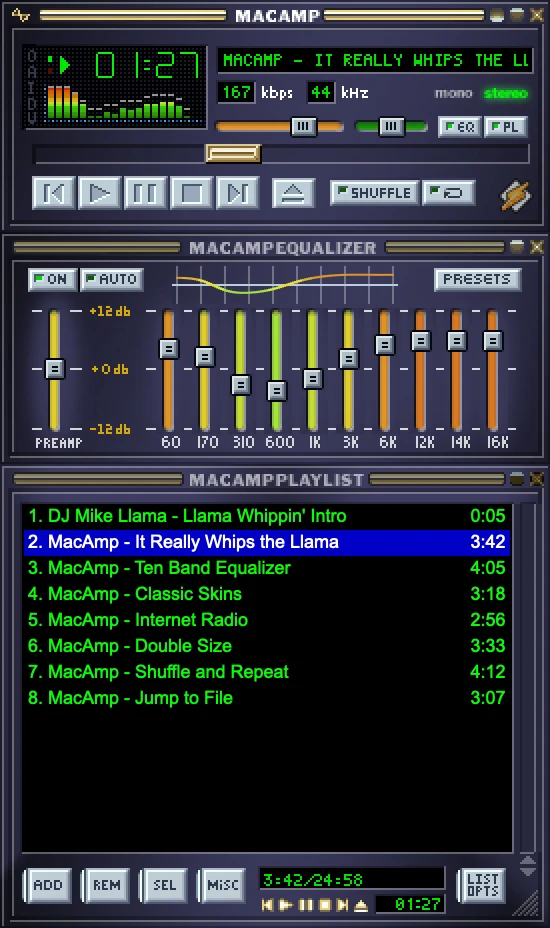
The real MacAmp windows, playing
Everything in its place.
Three docked windows, exactly like the original. Every control is drawn from the skin itself.
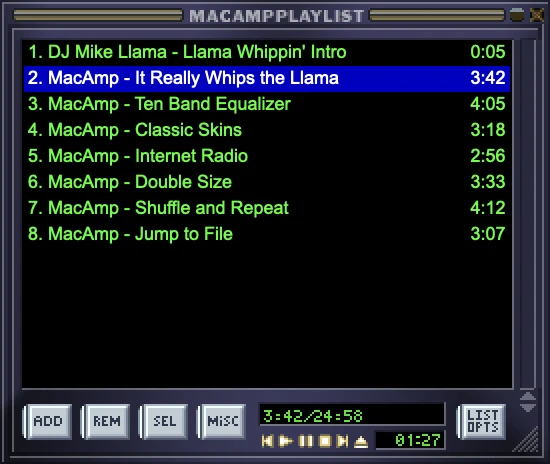
The playlist does the work.
Add files, folders or URLs and drag tracks anywhere in the list. M3U, PLS, XSPF and CUE sheets load and save, shuffle remembers where it has been, and F3 finds a track as you type.
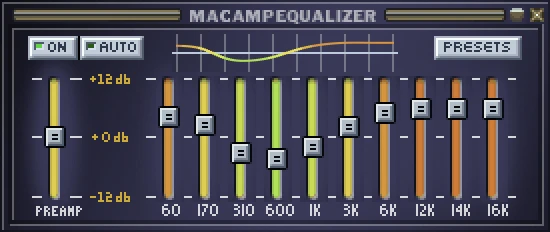
Ten bands, seventeen presets.
The authentic Winamp curve editor: preamp, ON/AUTO, presets from Rock to Classical, .eqf import and export. Beyond the EQ — pitch, playback speed and reverb.
Skins load like it's 1999.
Any classic .wsz or .zip skin: bitmaps, REGION masks, skinned cursors. Double Size at one click, and every window follows.
Internet radio, no adapters.
SHOUTcast and Icecast with live StreamTitle, buffering and reconnecting on their own. A directory with bandwidth and genre filters; stations saved to Bookmarks.
Reads what you have.
The decoders are built in, so there is nothing to install. An optional FFmpeg plug-in adds the rest of the zoo.
- MP3
- FLAC
- OGG
- Opus
- AAC
- ALAC
- WAV
- AIFF
- MP2
- AU
- MIDI
- MP4
- M4V
- MOV
- MKV
- WebM
- AVI
- WMV
- APE
- WavPack
- AC-3
- DTS
Your fingers already know.
The original transport keys answer in every MacAmp window. Try them here — or in the app.
PRESS Z X C V B
On your keyboard these are the same keys MacAmp answers to, on any layout.
No keyboard at hand? Tap the keys.
And the rest of the 2.95 world.
The windows you forgot you knew, in the same skin.
Media Library
Artists, albums, custom queries and playlists in the GEN window.
⌥L
Video
A muted AVPlayer locked to the audio clock, with audio-track and subtitle pickers.
⌥V
Minibrowser
A WebKit window in an MB frame; audio links on a page play in MacAmp.
⌥T
Track Info
Reads and writes ID3v1 and ID3v2, artwork included, with the MPEG technical readout.
⌥3
Jump to File
Search the playlist by title, artist or file name: Enter plays, Shift-Enter enqueues.
F3
Audio CDs
Plays mounted discs, looks titles up on MusicBrainz and rips to FLAC, ALAC, AAC, WAV or AIFF with tags.
Disk Writer
The classic out_disk: plays the playlist straight into FLAC, ALAC, AAC, WAV or AIFF files.
Visualizer Studio
Five AVS-style presets fullscreen, from a fire spectrum to a CRT oscilloscope.
⌃⇧K
Plug-ins.
Get plug-ins in MacAmp leads here. Skins come from the Winamp Skin Museum right in the app.
FFmpeg plug-in (in_ffmpeg)
MacAmp converts a file in one of these formats once into MP4 or FLAC and plays it as usual. The plug-in runs as a separate program, so a broken file can't take the player down.
Unzip it and open MacAmp FFmpeg.macampplugin (or drop it on MacAmp). MacAmp asks before installing.
- MKV
- WebM
- AVI
- WMV
- FLV
- MPEG
- TS
- 3GP
- WMA
- APE
- WavPack
- TTA
- AC-3
- DTS
- MKA
- AMR
FFmpeg 9.0.2, LGPL · Apple Silicon and Intel · 5 MB
Two minutes to 1998.
Download, drag, play. No permissions to grant.
Move it to Applications
Get the DMG and drag MacAmp into your Applications folder.
Open MacAmp
Launch it from Applications. The three windows arrive docked, exactly like the original.
Drop your music
Drag files or whole folders onto any window and press X. It really plays.
If macOS blocks the first launch
MacAmp ships without Apple notarization, so Gatekeeper may show a one-time warning. After the launch attempt, go to System Settings → Privacy & Security → Open Anyway. Continue only if you trust the build.
It really whips the llama's ass.
MacAmp for macOS 14 and later. The whole player in one DMG.
Version 0.8 · Universal build: Apple Silicon and Intel.
Before the first play.
Is this the real Winamp?
It is a faithful reproduction of Winamp 2.95 for macOS, built with AppKit and AVFoundation — not an emulator and not a web wrapper. The windows, dialogs and behaviours follow the original; the audio itself is decoded by native macOS engines.
Which formats can it play?
Out of the box: MP3, FLAC, OGG, Opus, AAC, ALAC, WAV, AIFF, MP2, AU and MIDI (rendered with the General MIDI synth), plus MP4, M4V and MOV video. The optional FFmpeg plug-in adds MKV, WebM, AVI, WMV, APE, WavPack, AC-3, DTS and more — see Plug-ins above.
Where do I get skins?
Any classic Winamp 2.x skin in .wsz or .zip format works. Open Preferences → Skins and add your files; region masks and skinned cursors are supported, and every window follows the skin.
Why does macOS warn me about the app?
The DMG is not notarized with an Apple Developer ID, so Gatekeeper shows a one-time warning on the first launch. Use System Settings → Privacy & Security → Open Anyway if you trust the build.
Does internet radio work?
Yes — SHOUTcast and Icecast streams with live ICY track titles, automatic reconnection and a directory with bandwidth and genre filters. Rare Ogg Vorbis streams play through a fallback path, without the equalizer and visualizer on those.
What is not implemented yet?
Milkdrop-style visual plug-ins, Last.fm scrobbling and tracker formats (MOD, XM, S3M, IT) are planned for later releases. Everything described on this page works today.
Made by Alex Rel.
MacAmp and EzSwitch are my two Mac apps: one brings the player back, the other fixes your keyboard. Have a look at the second one.