How Markdown Became the Web's Plain-Text Language
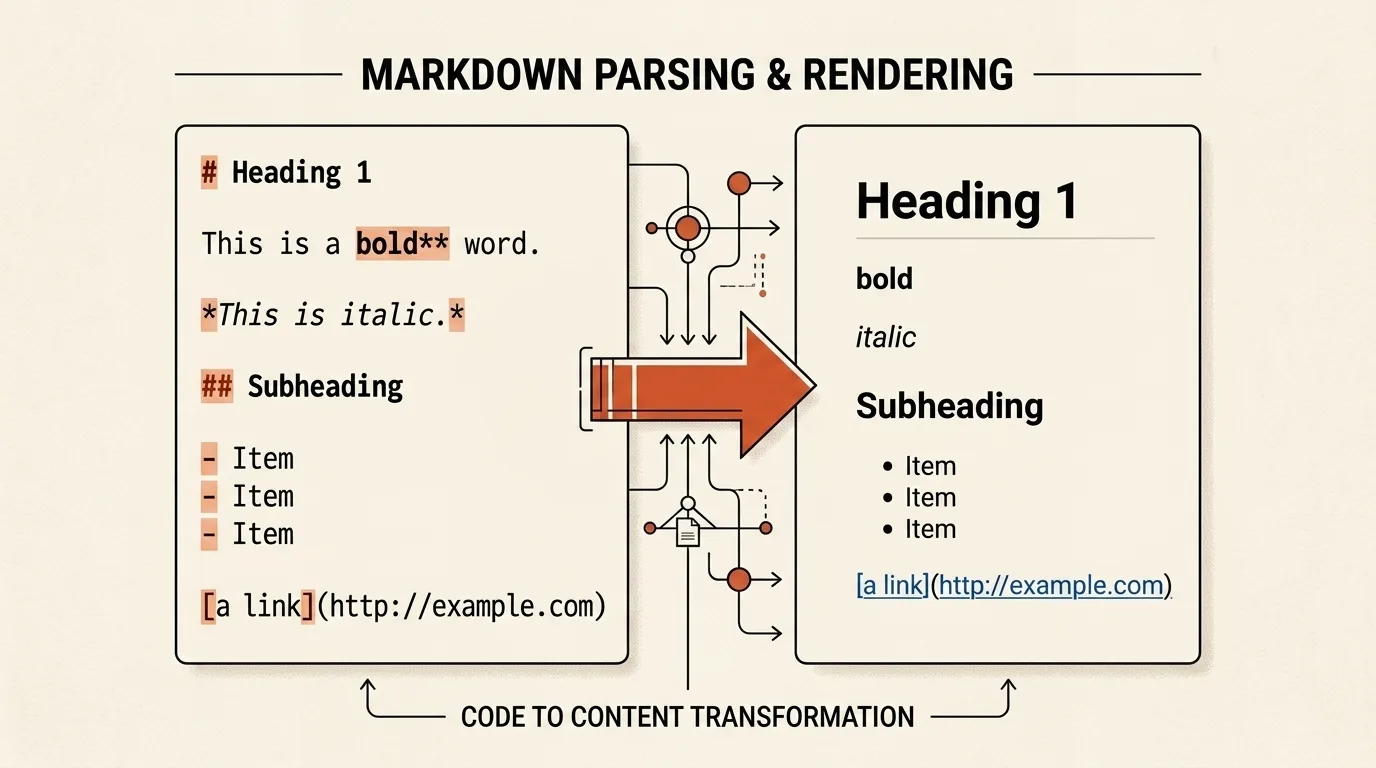
Markdown is easiest to notice when it behaves differently from what a writer expected. A list suddenly continues as a paragraph, indentation moves a block into the wrong place, or a line beginning with a hash is not treated as a heading. When the format works normally, its punctuation barely interrupts the reading experience, and that was its central design goal. In 2004, Markdown offered web writers readable source text and delegated the conversion to HTML to a small program. Two decades later, the same principle suits README files, documentation, notes, and interfaces that display language-model responses.
It began as both a format and a Perl script
On March 15, 2004, John Gruber published Introducing Markdown on Daring Fireball. He presented it as a text-to-HTML tool for web writers that could run as a plug-in for Movable Type and Blosxom or as a standalone Perl script. One name referred to two related things from the beginning: a way to write structured plain text and Markdown.pl, the program that performed the conversion.
Gruber was not trying to replace HTML with another universal language. In the original syntax documentation, he separated their roles clearly: HTML is a publishing format, while Markdown is a writing format. When Markdown's deliberately small syntax could not express something, an author could insert regular HTML. That decision kept the format compact instead of copying all the complexity of web markup into it.
Gruber described plain text email as the largest source of inspiration. The > character already suggested an email quotation, asterisks looked like emphasis, and hyphens naturally read as list markers. Setext, atx, Textile, reStructuredText, Grutatext, and EtText also influenced the syntax. Markdown was therefore not one isolated invention; it selected familiar text conventions that preserved their meaning without a visual editor.
What Aaron Swartz contributed
Aaron Swartz contributed more than an ordinary beta user, but his role is best described in the language of the project itself. On the Markdown project page, Gruber credits Swartz's ideas, feedback, and testing with substantially improving the syntax. The same page links Swartz's html2text, which handled the reverse direction by turning HTML into readable Markdown-compatible text.
Swartz had previously published a structured text format called atx. The original Markdown documentation lists atx among its influences and calls hash-prefixed headings ATX-style headings. That relationship is well documented, but it does not show that every heading rule was copied unchanged or that Swartz's contribution can be reduced to the # character. It is more accurate to describe him as a participant in the format's design and testing, while Gruber wrote the first converter and handled the public release.
Markdown continued to change after the March announcement. Version 1.0 left beta on August 28, 2004, and Gruber released Markdown 1.0.1 on December 17 with bug fixes and revised handling for several ambiguous cases. On the same day, the project moved from the GPL to a more permissive BSD-style license, making it easier for other software to incorporate the converter and its ideas.
Readable syntax is not necessarily unambiguous syntax
Markdown had detailed documentation for headings, links, block quotes, lists, emphasis, and code, but it did not have a formal parser specification. That distinction was easy to miss in ordinary writing. **text** clearly resembled strong emphasis, # Heading looked like a heading, and a blank line separated paragraphs. Problems appeared when structures were nested or when more than one rule could explain the same line.
How many spaces should precede a nested list? Can a heading begin immediately after a paragraph? In an ambiguous line, does a list marker, code span, or link take precedence? The documentation did not always answer such questions, and the behavior of Markdown.pl did not always match the prose. Authors of new parsers made different choices and introduced extensions for tables, strikethrough, footnotes, and fenced code blocks. Markdown consequently became a family of related dialects, and the same file could render differently in two systems.
From Standard Markdown to CommonMark
In 2014, a group of parser authors and engineers from large platforms began formalizing a compatible core language. The participants included Pandoc author John MacFarlane, Jeff Atwood, and people associated with GitHub, Reddit, Stack Overflow, and Meteor. The project was initially called Standard Markdown, but Gruber asked them not to use Markdown in a name that could imply a single official standard. In September 2014, it was renamed CommonMark.
CommonMark did more than rewrite the old guide in stricter prose. Its specification contains hundreds of Markdown and HTML pairs that both explain a rule and test an implementation. It defines precedence between block and inline structures, whitespace handling, list boundaries, links, code spans, and other disputed areas. The current published specification is numbered 0.31.2, so CommonMark has not formally reached 1.0, but its rules already provide a practical foundation for many parsers.
GitHub does not use unmodified CommonMark. It specifies GitHub Flavored Markdown as a strict superset of CommonMark, with extensions for tables, task lists, strikethrough, and additional autolinks. This illustrates how the modern ecosystem works: CommonMark supplies a compatible core, and an individual platform adds features needed by its interface.
Why the format outlived its original environment
Markdown has lasted not because one parser defeated every alternative, but because its central advantage survives across dialects. Structure remains visible in the source, a file opens in an ordinary text editor, and conversion does not require a closed binary format. Those properties work well with version control, technical documentation, static site generators, and applications that keep notes as text files.
The same reasoning helps explain Markdown-like output in AI interfaces. Many chat clients can render headings, lists, links, and code blocks while leaving the underlying character sequence understandable without rendering. It would still be inaccurate to claim that every language model uses Markdown internally or must always follow it. A model generates text, and the application decides which constructs to recognize, permit, and display safely.
What our editor does
The Markdown Editor runs in the browser and places a live preview beside the source editor. Its toolbar inserts headings, emphasis, links, images, lists, block quotes, task lists, code blocks, and tables. The tool also provides undo and redo, word and character counts, synchronized scrolling, an HTML view with line numbers, HTML copying, and .md or .html downloads.
Rendering uses Marked with the GFM and breaks options enabled. Tables, task lists, strikethrough, and fenced code blocks are supported, while a single newline is rendered as a line break. That behavior is convenient in an interactive editor, but it is not guaranteed to match every other Markdown parser.
There are two important limitations. The editor does not persist the document across page reloads, so download or copy the result before closing the tab. Marked also does not sanitize generated HTML, and our preview does not add a separate sanitizer. Use the editor for text you wrote or trust, and do not treat unknown Markdown as safe HTML for another site. Conversion itself happens locally, although remote images or other resources included in the preview can still be requested by the browser from their specified addresses.
Related tools


Frequently asked questions
Who created Markdown?
John Gruber wrote the first Markdown.pl converter, defined the format's goals, and released it through Daring Fireball in 2004. Aaron Swartz discussed the syntax, contributed ideas, tested Markdown, and wrote the reverse html2text converter. The most accurate short account is that Gruber created and implemented Markdown with substantial input from Swartz.
Why did Markdown become popular?
Markdown keeps its source understandable without rendering while still converting into structured HTML. It was easy to integrate into blogs, repositories, forums, and documentation generators, and the converter's permissive license helped other implementations appear. Its popularity produced several compatible dialects rather than one universal Markdown parser.
How does CommonMark differ from original Markdown?
The original Markdown documentation described its main constructs but left many combinations of lists, indentation, links, and blocks open to interpretation. CommonMark turns those edge cases into detailed rules and hundreds of examples that double as conformance tests. GitHub Flavored Markdown builds on CommonMark and adds extensions such as tables and task lists.
Why do AI responses often look like Markdown?
Many chat interfaces recognize Markdown-like headings, lists, links, and code blocks because those structures remain readable in a raw text response. The model produces a sequence of text, while the client application decides how to render it. Markdown is therefore convenient for AI interfaces, but it is not a mandatory format for every model or every answer.

Author
Alex RelFullstack Engineer
In commercial development since 2011 — over 15 years. Author of two SaaS products, TeleGo.io and LingvoHabit.com. The articles here come out of real client and product work.