ASCII Generator: Convert Images to ASCII Art
In the modern web era, retro text graphics have evolved into a distinct aesthetic style: from GitHub README headers and terminal welcome screens to website art and digital avatars.
However, creating ASCII art manually or using outdated CLI scripts can be limiting — output is often either visually blocky or lacks color and fine contrast control.
What is ASCII Generator
ASCII Generator is a next-generation browser-based text graphics converter. It combines classical pixel luminance mapping algorithms with modern HTML5 Canvas rendering and interactive visual effects:
- Raster and SVG to Text Conversion: Transforms photos and icons into clean monospace ASCII art grids.
- Original Source RGB Coloring: Preserves authentic photo colors on a per-character level.
- Interactive Canvas Animations: Dynamic cursor-following wave flow (Wave FX) and digital noise distortions (Glitch FX).
- Advanced Dithering: Smooth shading using Floyd-Steinberg error diffusion and Bayer matrix patterns.
- One-Click Export: Copy plain text for code files or download high-resolution transparent PNG images.
All processing executes 100% locally inside your web browser.
Loading Files and Sample Artworks
The Source Image section provides multiple input options:
- Upload Image — Load local PNG, WebP, JPEG, or SVG files from your disk.
- Drag-and-Drop — Drag any image file directly onto the canvas area.
- Sample Presets — Instantly load built-in sample artworks (portraits, retro logos, icons) to test settings immediately.
Once loaded, images automatically scale to your target character grid dimensions while maintaining original aspect ratios.
Pixel Luminance and Character Ramps
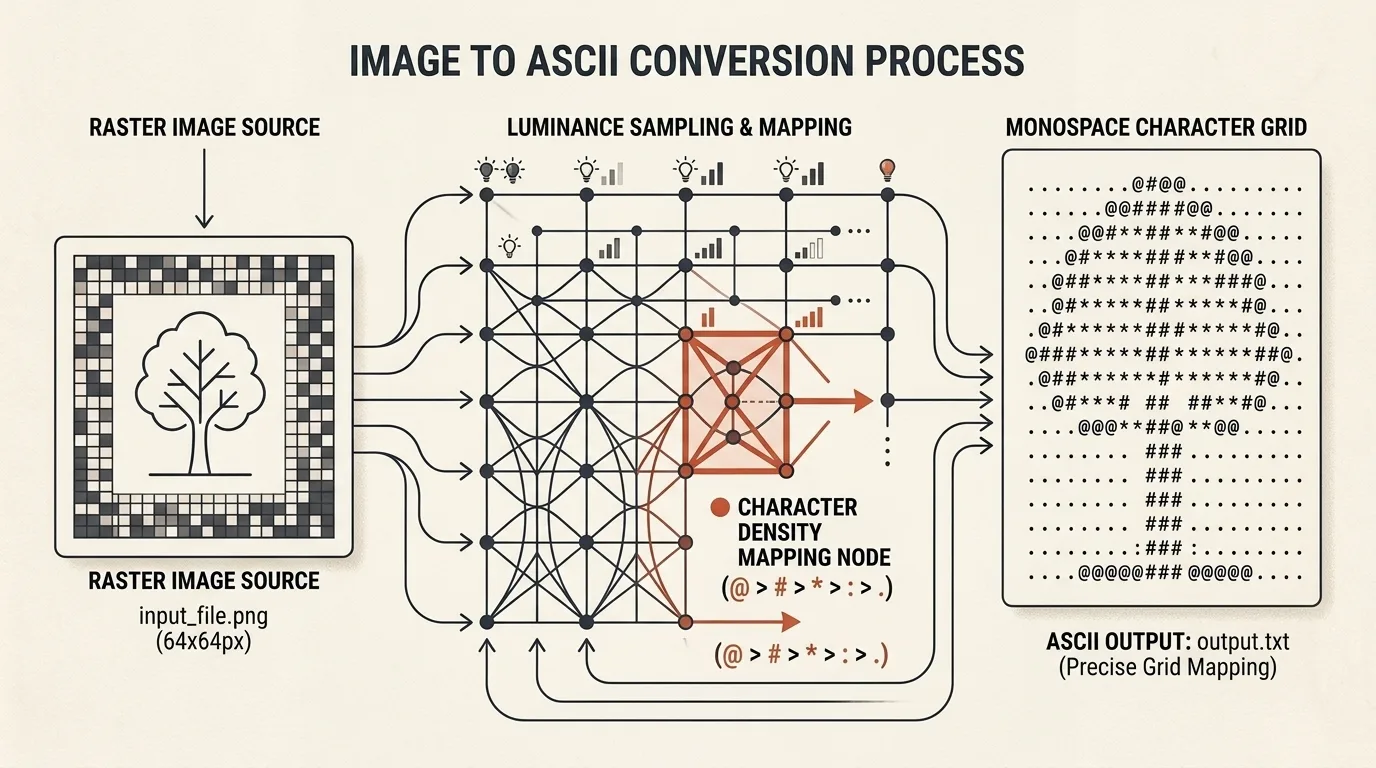
At the core of the generator is a luminance calculation algorithm. Each image region is analyzed using perceptual human eye weighting:
$$\text{Luminance} = 0.299 \times R + 0.587 \times G + 0.114 \times B$$
Calculated luminance values map directly to a selected character density ramp — transitioning from light punctuation to dense fill blocks:
- Classic (
.:-=+*#%@) — Universal standard for high-contrast photos and portraits. - Blocks (
░▒▓█) — Terminal pseudo-graphics and dense blocks for retro interface styling. - Minimal (
.:#@) — Concise high-contrast set for minimalist icons. - Matrix (
01) — Binary mode composed of zeros and ones for a cyberpunk aesthetic. - Detailed — Extended 70-character scale for maximum detail resolution and smooth tonal transitions.
- Custom Ramp — Enter any arbitrary character string to create custom text textures or brand lettering.
The Invert Ramp toggle reverses character ordering, swapping dark and light mapping for dark or light backgrounds.
Dithering and Tonal Control
To prevent harsh color banding and generate smooth shading, built-in dithering options are available:
- None — Direct luminance quantization without error distribution.
- Floyd-Steinberg — Error diffusion algorithm that spreads brightness quantization residuals to adjacent characters, producing an organic texture.
- Bayer 2×2 / 4×4 — Ordered matrix dithering that forms a retro grid pattern reminiscent of vintage displays.
Contrast, Brightness, and Posterize controls provide granular gamma adjustment.
Color Modes and Brand Palettes
ASCII Generator supports several distinct coloring modes:
- Original Source Colors — Colors every character with the exact RGB value of its underlying photo pixels.
- Monochrome — Classic black-and-white mode (white on black or black on white).
- Matrix Green & Amber CRT — Retro phosphor terminal styling.
- Gradient Themes — Neon gradient presets (Cyberpunk, Ice Blue, Sunset, Vaporwave).
- Brand Palettes — Integration with the unified Brand Palette system to color characters using official company design tokens.
Interactive Canvas FX (Wave & Glitch)
Unlike static converters, ASCII Generator supports real-time interactive canvas effects:
- Mouse Wave Flow (Wave FX) — Moving your cursor across the canvas triggers a kinetic wave that shifts character scale and position dynamically.
- Glitch Animation (Glitch FX) — Real-time random line displacements and digital signal noise.
- Scanlines & CRT Glow — Emulates vintage CRT monitor scanlines with warm character phosphor bloom.
Preview Backgrounds and Transparency
The Preview background block lets you evaluate output readability:
- Checkered pattern (for transparency inspection);
- Dark gray or pure black;
- Pure white or light gray;
- Custom hex color input.
When exporting to PNG, transparent backgrounds are preserved so you can overlay your ASCII art onto web pages.
Exporting Results
You can export your completed art in several formats:
- Copy ASCII Text — Instantly copy plain monospace text to your clipboard. Characters retain alignment when pasted into
<pre>tags or text editors. - Download .txt — Download a plain UTF-8 text file.
- Download PNG — Export a high-resolution raster image complete with all active visual effects, source colors, and alpha channel transparency.
Step-by-Step Workflow: Photo to Neon ASCII Art
- Load a photo using Upload Image or drag-and-drop your file onto the canvas.
- Select Classic or Detailed in the Character Ramp panel.
- Adjust Grid Width (e.g., 100–120 columns for high resolution).
- Enable Floyd-Steinberg dithering for smooth shadows.
- Set color mode to Original Source Colors or Matrix Green.
- Enable Mouse Wave Flow and move your cursor across the canvas to test interactive effects.
- Click Copy ASCII Text for plain text or download a high-DPI PNG image.
ASCII Generator combines local browser speed with retro text art aesthetics, allowing you to create striking text illustrations without installing desktop software.
Related Tools


Frequently asked questions
What is ASCII Generator?
ASCII Generator is a browser-based tool for converting raster photos, illustrations, and vector icons into text-based ASCII art. It features source photo RGB color preservation, dithering algorithms, interactive wave & glitch canvas effects, and export to plain text or transparent PNG.
Which image formats are supported?
The tool supports any image format handled by your browser (PNG, WebP, JPEG, SVG, GIF frames), and includes sample artworks or drag-and-drop file loading.
How does pixel-to-character mapping work?
The engine divides the image into a grid, calculates the luminance of each pixel block, and maps it to a character ramp — from sparse dots for bright areas to dense characters (@, #, █) for dark zones.
Can I copy the output as plain text?
Yes. You can instantly copy the generated monospace text grid to your clipboard for use in README.md files, terminal prompts, source code headers, or commit comments.
What is the difference between dithering algorithms?
Floyd-Steinberg diffuses quantization errors across neighboring pixels to create smooth organic gradients, while Bayer uses a matrix grid pattern for retro display textures.
Can I keep the original photo colors?
Yes. In Original Source Colors mode, each character samples the exact RGB color of the source image pixels. Monochrome, neon Matrix, Amber CRT, and brand palettes are also available.
Are images uploaded to any server?
No. All pixel sampling, brightness calculations, dithering, and canvas rendering happen 100% locally inside your browser. Your files never leave your device.
What export formats are available?
You can copy plain ASCII text, download a `.txt` file, or export a high-resolution transparent PNG image with custom scaling and background settings.